

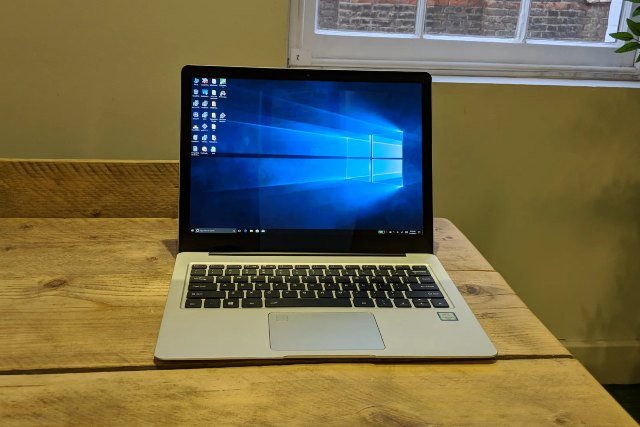
The Cube Thinker i35 is often searched by buyers who want a compact, affordable Windows device, but there is one important thing to clear up first: it is not technically a mini PC. The Cube Thinker i35, also known as the AllDoCube Thinker i35, is a slim 13.5-inch Windows laptop with a high-resolution touchscreen, Intel Core m3 processor, 8GB RAM, and 256GB SSD storage. Sources such as NotebookCheck, TechRadar, and TechTablets list it as a laptop or notebook rather than a desktop-style mini PC.
- What Is the Cube Thinker i35?
- Cube Thinker i35 Specifications
- Cube Thinker i35 Design and Build Quality
- Cube Thinker i35 Display Quality
- Cube Thinker i35 Performance Review
- Is the Cube Thinker i35 Good for Students?
- Is the Cube Thinker i35 Good for Office Work?
- Battery Life and Heat Management
- Cube Thinker i35 Storage and Upgrade Options
- Cube Thinker i35 vs Mini PC: Which One Should You Buy?
- Pros of the Cube Thinker i35
- Cons of the Cube Thinker i35
- Who Should Buy the Cube Thinker i35?
- Buying Tips Before You Purchase
- Cube Thinker i35 Review Verdict: Is It Worth Buying?
- FAQ About Cube Thinker i35
- Conclusion
That said, many people still compare it with mini PCs because it is compact, lightweight, and designed for everyday computing rather than heavy gaming or professional workstation tasks. In this Cube Thinker i35 review, we will look at its design, display, performance, battery life, real-world usability, and whether it still makes sense to buy today.
What Is the Cube Thinker i35?
The Cube Thinker i35 is a premium-looking Windows laptop from Cube/AllDoCube, a Chinese tech brand known for affordable tablets, laptops, and hybrid devices. It gained attention because it offered a 13.5-inch 3:2 touchscreen with a very sharp 3000 x 2000 resolution, similar in format to Microsoft’s Surface-style productivity screens. TechTablets describes the Cube Thinker i35 as a touch-enabled Core m3-7Y30 laptop with a 3000 x 2000 3:2 display, wireless AC, 8GB RAM, 256GB SSD, USB Type-C, USB ports, DC charging, and fingerprint security.
For users who want a clean-looking laptop for web browsing, writing, video streaming, online classes, business work, and light productivity, the Thinker i35 was an attractive choice when it launched. It was not built as a gaming laptop, editing machine, or high-performance workstation. Its biggest appeal was the combination of a premium metal body, sharp screen, fanless design, and affordable pricing compared with more expensive ultrabooks.
Cube Thinker i35 Specifications
The Cube Thinker i35 comes with an Intel Core m3-7Y30 processor, Intel HD Graphics 615, 8GB RAM, and 256GB SSD storage, according to NotebookCheck and TechRadar. The processor is a low-power Kaby Lake chip designed for thin, quiet, fanless laptops rather than demanding performance machines.
Its screen is one of the strongest parts of the device. The 13.5-inch IPS touchscreen has a 3000 x 2000 resolution with a 3:2 aspect ratio, which gives users more vertical space than common 16:9 laptops. That makes it useful for reading articles, working in documents, browsing websites, and editing spreadsheets. TechRadar’s review also confirms the 13.5-inch 3000 x 2000 touchscreen configuration.
The laptop includes Wi-Fi, Bluetooth, USB connectivity, and a 256GB SATA SSD. NotebookCheck lists Wi-Fi 802.11 a/b/g/n/ac, Bluetooth 4.0, two USB 3.0/3.1 Gen1 ports, and a 5000mAh lithium-polymer battery.
Cube Thinker i35 Design and Build Quality
The design is one of the main reasons people still search for the Cube Thinker i35. It has a clean metal body and a premium look that feels more expensive than many budget laptops. TechTablets praised the build quality and described it as a strong step up compared with many earlier Cube devices.
In real-world use, this matters because budget laptops often cut corners on body quality, hinge strength, keyboard feel, or screen sharpness. The Thinker i35 tried to offer a more polished ultrabook experience at a lower price. Its thin profile and simple design make it suitable for students, remote workers, writers, and anyone who wants a stylish portable machine.
However, buyers should remember that this is an older device. Even if the build feels premium, used or refurbished units may have battery wear, keyboard wear, display marks, or charger issues. If you are buying the Cube Thinker i35 today, condition matters more than the original specifications.
Cube Thinker i35 Display Quality
The display is the strongest selling point of the Cube Thinker i35. A 3000 x 2000 resolution on a 13.5-inch screen is very sharp, and the 3:2 aspect ratio is excellent for productivity. Compared with a traditional 16:9 laptop screen, a 3:2 screen shows more vertical content, so you scroll less when reading, writing, or browsing.
TechTablets highlighted the display as a major feature and noted that the Thinker i35 uses a Surface Book-style 13.5-inch fully laminated screen with 3000 x 2000 resolution.
For everyday users, this means text looks crisp, images look detailed, and the laptop feels more premium than many low-cost machines with basic 1080p panels. If your main tasks include writing blogs, reading PDFs, managing emails, watching videos, or working in Google Docs, the display can still feel impressive.
The downside is that a high-resolution display can put more pressure on the battery and low-power processor. It also means replacement parts may be harder to find if the screen gets damaged.
Cube Thinker i35 Performance Review
The Cube Thinker i35 is powered by the Intel Core m3-7Y30, a dual-core, four-thread Kaby Lake processor with Intel HD Graphics 615. NotebookCheck lists the CPU as running from 1.0GHz to 2.6GHz, while TechRadar also identifies the laptop’s processor as the Intel Core m3-7Y30 dual-core chip.
For basic daily use, the Cube Thinker i35 can handle web browsing, email, YouTube, Microsoft Office, Google Docs, light image editing, video calls, and file management. The 8GB RAM is enough for moderate multitasking, especially if you avoid keeping too many browser tabs open.
However, this is not a laptop for heavy workloads. It is not ideal for modern gaming, 4K video editing, 3D rendering, large Photoshop projects, coding with heavy local environments, or running multiple demanding apps at once. The Core m3-7Y30 was designed for quiet, efficient performance, not raw power.
If you are comparing the Cube Thinker i35 with a modern mini PC, many current mini PCs with newer Intel N-series, Ryzen, or Core processors will offer better performance. That is why the Thinker i35 only makes sense today if you find it at a very affordable price and mainly need a portable productivity laptop.
Is the Cube Thinker i35 Good for Students?
The Cube Thinker i35 can be useful for students who need a laptop for notes, research, online learning, assignments, and presentations. The sharp touchscreen display makes reading and writing comfortable, and the slim design makes it easy to carry.
For students who mainly use browser-based tools like Google Docs, Google Classroom, Gmail, YouTube, Canva, and Microsoft Office, the Thinker i35 can still be practical. The 3:2 screen is especially helpful for reading long documents and research material.
The caution is battery condition. Since this is an older model, a used Cube Thinker i35 may not provide the battery life it had when new. Students who attend long classes or travel often should check battery health before buying.
Is the Cube Thinker i35 Good for Office Work?
For office tasks, the Cube Thinker i35 is a good fit if your work is light to moderate. It can handle spreadsheets, documents, email, browser dashboards, Zoom-style calls, and cloud-based tools. The keyboard and screen size make it more comfortable than a tablet for longer writing sessions.
It is especially suitable for freelancers, bloggers, virtual assistants, online sellers, and small business users who need a simple Windows laptop for daily tasks. The SSD also helps the system feel more responsive than older laptops with mechanical hard drives.
But if your office work involves large Excel files, heavy multitasking, accounting software with large databases, video editing, or multiple external monitors, a newer laptop or mini PC would be a safer choice.
Battery Life and Heat Management
The Cube Thinker i35 uses a fanless design, which means it runs quietly. TechRadar noted that the device has no fans and uses the underside of the laptop as part of its heat dissipation approach.
A fanless laptop is pleasant for quiet environments such as libraries, bedrooms, offices, and classrooms. There is no fan noise during writing, browsing, or watching videos.
However, fanless systems can reduce performance when they get warm. Under heavier workloads, the processor may slow down to manage heat. That is normal for thin Core m laptops. The Cube Thinker i35 is best used for steady everyday tasks rather than long high-performance sessions.
Battery life is another area where expectations should be realistic. NotebookCheck lists a 5000mAh lithium-polymer battery for the Cube i35 Thinker. Because this is an older laptop, battery health will vary widely from unit to unit. A well-kept device may still be usable, while a heavily used one may need frequent charging.
Cube Thinker i35 Storage and Upgrade Options
The Cube Thinker i35 originally came with 256GB SSD storage, which is enough for documents, browsing, apps, and moderate media storage. TechRadar lists the storage as a 256GB SATA SSD, while TechTablets also mentions a 256GB SSD configuration.
For most casual users, 256GB is acceptable. You can store office files, photos, PDFs, and software without immediately running out of space. For heavier media users, external storage or cloud storage may be needed.
Before buying, check whether the SSD is working properly and whether the seller has reset Windows cleanly. Older budget laptops can sometimes come with unstable installations or aging drives, so it is smart to test boot speed, file transfers, and system health.
Cube Thinker i35 vs Mini PC: Which One Should You Buy?
The comparison depends on what you actually need. If you want a portable all-in-one device with screen, keyboard, touch support, and battery, the Cube Thinker i35 makes more sense than a mini PC. It is a laptop, so you can carry it anywhere and use it without a monitor.
If you want better performance at a desk, a modern mini PC may be the better option. A mini PC can often give you newer processors, more RAM, faster storage, better ports, and easier upgrades. But it needs a separate monitor, keyboard, mouse, and power supply.
The Cube Thinker i35 is better for portability. A mini PC is better for a fixed desk setup. Buyers searching for “Cube Thinker i35 mini PC” should understand this difference before making a purchase.
Pros of the Cube Thinker i35
The biggest advantage of the Cube Thinker i35 is its display. The 13.5-inch 3000 x 2000 touchscreen is sharper and more productivity-friendly than many budget laptop screens. The 3:2 aspect ratio is excellent for reading, writing, and browsing.
The second major advantage is build quality. Reviews from sites such as TechTablets praised the premium feel and metal construction, which made the device stand out among affordable Chinese laptops at the time.
The third benefit is quiet operation. Because it uses a fanless Core m processor, it can stay silent during light everyday use. For writers, students, and office users, that can make the laptop feel more comfortable.
Cons of the Cube Thinker i35
The main weakness is age. The Cube Thinker i35 is not a new device, and its Intel Core m3-7Y30 processor is far behind modern laptop and mini PC chips. It is fine for basic use, but it is not future-proof for demanding software.
The second issue is battery condition. Since most available units today are likely used or old stock, battery performance may be weaker than expected.
The third issue is support and parts availability. Compared with major brands like Dell, HP, Lenovo, or Microsoft, replacement parts and official service may be harder to find in many countries.
Who Should Buy the Cube Thinker i35?
The Cube Thinker i35 is worth considering if you want an affordable used laptop with a premium screen, slim design, and basic Windows performance. It suits students, writers, bloggers, office workers, and casual users who mostly work online.
It can also be a good secondary laptop for travel, reading, writing, and media consumption. If the price is low and the condition is good, it can still offer value.
However, it is not the right choice for gamers, video editors, developers running heavy tools, or buyers who want long-term software performance. Those users should look for a newer laptop or a modern mini PC with updated hardware.
Buying Tips Before You Purchase
Before buying the Cube Thinker i35, check the battery health, screen condition, keyboard, touchpad, charger, ports, Wi-Fi, and SSD performance. Ask the seller for real photos and a working video if buying online.
Also confirm the exact model and specs. Some sellers may use confusing titles or incorrect descriptions. Since the Cube Thinker i35 is a laptop, be careful with listings that describe it as a mini PC.
Price is the most important factor. If it is priced close to newer budget laptops or newer mini PCs, it may not be the best deal. It only becomes attractive when the price is low enough to justify the older hardware.
Cube Thinker i35 Review Verdict: Is It Worth Buying?
The Cube Thinker i35 is still an interesting device because of its premium design, sharp 3K touchscreen, 3:2 display, SSD storage, and quiet fanless operation. For light productivity, writing, browsing, studying, and streaming, it can still do the job if the unit is in good condition.
But it is not a true mini PC, and it is not a modern performance machine. Its Intel Core m3-7Y30 processor, older battery, limited support, and aging hardware make it a risky buy unless the price is attractive.
So, is the Cube Thinker i35 worth buying? Yes, but only for the right user. If you need a low-cost, portable Windows laptop for simple daily tasks and you find a clean unit at a budget price, it can still be useful. If you want faster performance, better battery life, warranty support, or a desktop-style mini PC setup, you should choose a newer alternative.
FAQ About Cube Thinker i35
Is the Cube Thinker i35 a mini PC?
No. The Cube Thinker i35 is a 13.5-inch Windows laptop, not a mini PC. It is sometimes compared with compact PCs because it is slim and portable, but it includes its own screen, keyboard, battery, and touchscreen.
Is Cube Thinker i35 good for gaming?
The Cube Thinker i35 is not designed for gaming. Its Intel HD Graphics 615 can handle very light older games, browser games, and basic media tasks, but it is not suitable for modern gaming.
Is Cube Thinker i35 good for office work?
Yes, it can be good for light office work such as documents, emails, spreadsheets, web apps, and video meetings. For heavy multitasking or demanding software, a newer laptop or mini PC is better.
Does Cube Thinker i35 have a touchscreen?
Yes. The Cube Thinker i35 comes with a 13.5-inch touchscreen display with 3000 x 2000 resolution, according to TechRadar and TechTablets.
Should I buy a used Cube Thinker i35 today?
You can buy it if the price is low, the battery is healthy, and the device is in good condition. Avoid paying too much because newer laptops and mini PCs now offer better performance, better efficiency, and stronger long-term support.
Conclusion
The Cube Thinker i35 remains a memorable budget-friendly ultrabook because it offered a premium metal body, a beautiful 3K touchscreen, SSD storage, and a quiet fanless design. It was never really a mini PC, but it still appeals to people who want a compact Windows device for everyday work.
For students, writers, bloggers, and casual office users, it can still be a smart purchase at the right price. For gaming, heavy editing, modern business workloads, or long-term use, newer devices are a better investment. The best way to judge the Cube Thinker i35 today is simple: buy it for the screen and portability, not for raw power.