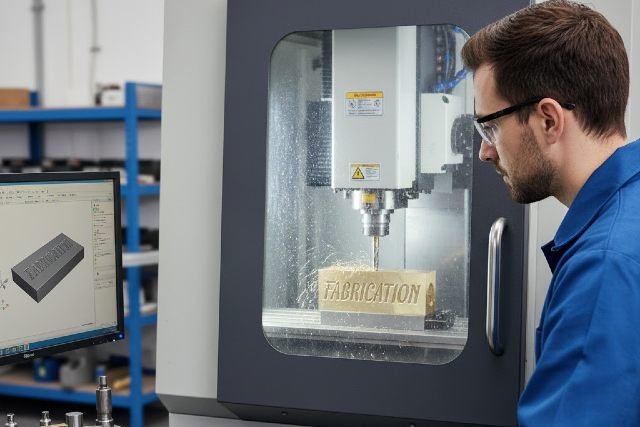
The demand for precision engraving continues to grow, and one of the most important techniques used across manufacturing, signage, personalization, and industrial labeling is Text Milling. Within the first 100 words, it’s crucial to understand that text milling involves cutting letters, numbers, or symbols into a surface using a CNC or mechanical milling system. This process delivers controlled depth, crisp edges, and long-lasting results that are more durable than surface marking methods.
- 1. Designing the Text Layout
- 2. Generating Toolpaths
- 3. Setting Up the Material and Machine
- 4. Milling the Text
- 5. Finishing and Cleanup
- Industrial Nameplates and Tags
- Signage and Wayfinding Systems
- Jewelry and Custom Gifts
- Mold, Tool, and Die Marking
- Memorial Plaques and Awards
- Durability and Depth
- Material Flexibility
- Edge Quality
- High Durability and Permanence
- Precision and Consistency
- Material Versatility
- Professional Aesthetic
- Use the Right Cutter for Each Material
- Adjust Speed, Feed, and Depth Properly
- Secure the Workpiece Firmly
- Use Vector-Friendly Fonts
- Perform Test Passes Before Final Work
Whether you’re new to CNC engraving or an established professional, understanding text milling helps you produce clearer, cleaner, and more consistent engraved typography. This guide explores how text milling works, its applications, tools, workflow, benefits, and best practices.
What Is Text Milling?
Text milling is the process of cutting text directly into a material using a milling spindle and cutting tool. Unlike laser engraving, which removes surface material through heat, milling uses mechanical force to carve into metal, plastic, wood, or composite surfaces.
This method is widely used when deep, permanent engravings are required. The depth and width can be controlled precisely, making it ideal for industrial nameplates, machinery labels, identification tags, memorial plaques, signage, mold marking, and commercial branding.
According to industry research published by SME (Society of Manufacturing Engineers), mechanical milling remains essential in applications requiring deep engraving, sharp edges, and long-term durability under harsh conditions.
How Text Milling Works: The Complete Process
1. Designing the Text Layout
Text milling begins with a digital design created using CAD or engraving software. Operators choose the font, size, kerning, and layout. Vector-based fonts are preferred because they generate clean toolpaths without distortion.
Software such as Gravostyle, VCarve, LightBurn (for CNC), or other CAM platforms converts text into precise milling paths. This stage ensures the cutter moves smoothly, which reduces the risk of chipping or uneven depth.
2. Generating Toolpaths
Next, the software calculates the toolpaths based on tool diameter, material hardness, and desired depth. Toolpath strategies include contouring, pocketing, and multi-pass depth cutting.
Proper toolpath generation is essential for clean results. According to MIT’s machining research, optimized toolpaths significantly reduce tool wear and improve surface finish.
3. Setting Up the Material and Machine
The workpiece is secured to the CNC bed or engraving platform. Alignment accuracy is critical, especially for industrial parts or signage where text placement must match exact specifications.
A stable setup minimizes vibration and helps maintain uniform line depth.
4. Milling the Text
Once the machine begins milling, the spindle rotates the cutter at high speed. The tool removes material gradually according to the programmed paths. Operators adjust speed, feed rate, and step-down values to achieve the desired sharpness and clarity.
Different materials require specific parameters. Hard metals use slower speeds and shallower passes, while softer materials allow faster milling and deeper cuts.
5. Finishing and Cleanup
After milling, the engraved letters may undergo polishing, brushing, or paint-filling. Clean edges and crisp lines create a professional appearance and improve text readability even in challenging environments.
Common Applications of Text Milling
Industrial Nameplates and Tags
Factories rely on durable text milling to mark serial numbers, equipment labels, identification plates, and compliance tags. Milled text withstands chemicals, friction, and extreme temperatures better than printed labels.
Signage and Wayfinding Systems
Architectural signs, room numbers, directional markers, and outdoor plaques frequently use text milling due to its permanence and aesthetic appeal. This method also supports ADA-compliant signage.
Jewelry and Custom Gifts
Text milling produces precise initials, dates, and messages on jewelry, metal pieces, and keepsakes. The process ensures fine detail with long-lasting clarity.
Mold, Tool, and Die Marking
Manufacturers often mill text into molds, dies, or metal tooling. These engravings maintain readability even after repeated use in industrial settings.
Memorial Plaques and Awards
Bronze, brass, and aluminum plaques frequently use milled text to create elegant, deep lettering that remains readable for decades.
Text Milling vs. Laser Engraving
Durability and Depth
Laser engraving is excellent for surface marking but cannot match the deep, tactile results of mechanical text milling. Milled text lasts longer, especially in outdoor or industrial environments.
Material Flexibility
Text milling works on:
metals
plastics
wood
glass (with diamond tools)
composites
laminates
Laser machines struggle with reflective metals unless coated or treated.
Edge Quality
Milled letters often have sharper edges and a more dimensional appearance. Lasers produce smooth, shallow marks that may fade over time.
Advantages of Text Milling
High Durability and Permanence
The depth of milled text ensures long-term readability. This is essential for safety plates, machine labels, and compliance markings.
Precision and Consistency
With CNC control, text milling offers predictable results, even on complex layouts or large production runs.
Material Versatility
Unlike some engraving methods, text milling handles a wide range of materials without requiring coatings or chemical treatments.
Professional Aesthetic
Text milling produces crisp lettering that looks high-end, making it popular for signage, awards, and branding elements.
Expert Tips for Improving Text Milling Quality
Use the Right Cutter for Each Material
Diamond drag tools are ideal for metals when a polished finish is needed, whereas carbide tools work well for deeper milling on plastics and aluminum. The tool geometry influences edge sharpness and text clarity.
Adjust Speed, Feed, and Depth Properly
Slower spindle speeds and shallower step-downs help when milling harder metals. Soft materials benefit from faster feeds that avoid melting or chipping.
According to mechanical machining studies from NIST, cutting forces depend heavily on these parameters and directly affect engraving accuracy.
Secure the Workpiece Firmly
Even slight vibration can cause misalignment, rough edges, or inconsistent depth. A stable setup ensures cleaner letters and smoother internal curves.
Use Vector-Friendly Fonts
Fonts designed for engraving — such as single-line or stick fonts — produce cleaner text and reduce tool wear.
Perform Test Passes Before Final Work
Testing allows operators to refine settings and avoid mistakes that may ruin valuable materials.
Case Study Example: Text Milling in a Manufacturing Workshop
A metal fabrication shop needed durable serial numbers on stainless-steel parts exposed to heat, chemicals, and abrasion. Laser engraving failed to provide enough depth, so the shop switched to CNC text milling.
After adjusting the cutter selection and depth settings:
the text became more readable
engravings lasted longer under harsh use
production became more efficient
customer quality ratings improved
This real-world scenario demonstrates why text milling remains essential for industrial durability.
Frequently Asked Questions (FAQ)
1. What is text milling used for?
Text milling is used to engrave permanent text onto metals, plastics, wood, and other materials for industrial, commercial, and artistic applications.
2. How deep can text milling go?
Depth varies by tool and machine but typically ranges from light surface etching to several millimeters for industrial marking.
3. Is text milling better than laser engraving?
It depends. Text milling is better for deep, long-lasting results; laser engraving is faster and ideal for surface marking.
4. What machines perform text milling?
CNC mills, rotary engraving machines, and hybrid engraving systems are commonly used.
5. Can beginners learn text milling easily?
Yes. With proper training and software guidance, beginners can achieve professional results.
Conclusion: Why Text Milling Remains an Essential Technique
In conclusion, Text Milling continues to play a vital role in modern manufacturing, personalization, signage, and industrial identification. In the conclusion, using the keyword reinforces its importance. The technique offers unmatched durability, deep engraving capability, sharp detail, and versatility across materials. Whether you are creating architectural signs, industrial tags, jewelry engravings, or tooling marks, text milling provides precision and long-term reliability.
With the right tools, optimized settings, and professional workflow, text milling delivers exceptional results that stand the test of time — making it an indispensable method for businesses and creators worldwide.