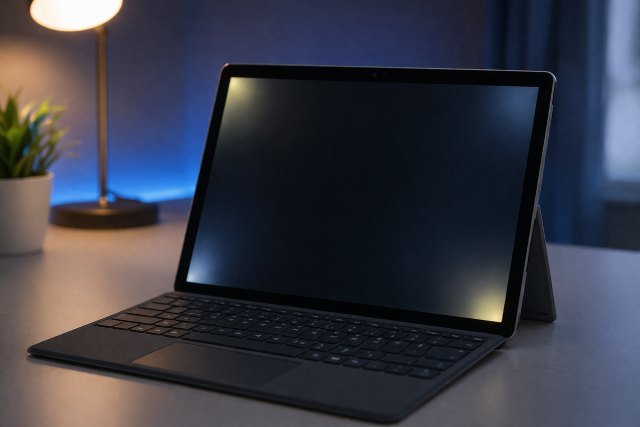
Surface Pro Backlight Bleed is a common concern among users who rely on their devices for productivity, design work, and entertainment. If you’ve ever noticed uneven bright spots or light leaking around the edges of your screen — especially on dark backgrounds — you’re likely dealing with this issue.
- What Is Surface Pro Backlight Bleed?
- Why Does Backlight Bleed Happen on Surface Pro?
- How to Identify Backlight Bleed on Your Surface Pro
- Is Surface Pro Backlight Bleed Normal?
- Best Ways to Reduce Surface Pro Backlight Bleed
- When Should You Replace Your Surface Pro?
- Real-World Impact of Backlight Bleed
- Preventing Backlight Bleed on Surface Pro
- Frequently Asked Questions (FAQ)
- Expert Insight and Industry Perspective
- Conclusion
In the first few weeks of using a Surface Pro, many users begin to observe subtle inconsistencies in brightness, particularly in low-light environments. While this may not always indicate a defect, it can impact viewing quality, especially for professionals working with visual content.
What Is Surface Pro Backlight Bleed?
Backlight bleed refers to the leakage of light from the edges or corners of an LCD display. In devices like the Surface Pro, which use LED-backlit IPS panels, this phenomenon occurs when light escapes unevenly through the screen layers.
Unlike OLED displays that emit light per pixel, LCD panels rely on a backlight source. If the panel assembly isn’t perfectly sealed or pressure is uneven, light can “bleed” through unintended areas.
This is why Surface Pro backlight bleed is often most visible when the screen displays black or dark images in a dimly lit room.
Why Does Backlight Bleed Happen on Surface Pro?
Several factors contribute to Surface Pro backlight bleed, and understanding them helps in identifying whether your device is within acceptable limits.
Manufacturing Tolerances
Even premium devices like the Surface Pro are subject to manufacturing variances. Slight misalignments in the display layers can cause uneven light diffusion. According to display experts at RTINGS, minor backlight bleed is considered normal in most IPS panels.
Pressure on the Screen
Physical pressure plays a significant role. If the device has been handled roughly, stored tightly in a bag, or pressed during cleaning, it can distort the panel layers. Over time, this can increase visible light leakage.
Panel Design Limitations
IPS displays are known for excellent color accuracy and viewing angles, but they are also more prone to backlight bleed compared to other technologies. This is a trade-off inherent in the design.
Heat and Aging
Extended use and heat buildup can slightly warp internal components. While rare, prolonged exposure to high temperatures may worsen Surface Pro backlight bleed over time.
How to Identify Backlight Bleed on Your Surface Pro
Before attempting fixes, it’s important to confirm whether what you’re seeing is actually backlight bleed.
A simple test involves setting your screen brightness to maximum and displaying a completely black image in a dark room. If you notice glowing patches, especially around edges or corners, that’s likely backlight bleed.
It’s important to distinguish this from “IPS glow,” which is a natural phenomenon where the screen appears brighter at certain viewing angles. IPS glow changes with perspective, while backlight bleed remains static.
Is Surface Pro Backlight Bleed Normal?
Yes, to a certain extent, Surface Pro backlight bleed is considered normal. Most manufacturers, including Microsoft, accept a small degree of light leakage as part of IPS display behavior.
However, excessive bleed — where bright patches distract from normal usage — is not acceptable and may qualify for a replacement under warranty.
According to Microsoft’s official support guidelines, display irregularities that significantly impact usability can be evaluated for hardware replacement.
Best Ways to Reduce Surface Pro Backlight Bleed
While you cannot completely eliminate backlight bleed without replacing the panel, there are several practical ways to reduce its visibility and impact.
Adjust Screen Brightness
Lowering brightness is one of the simplest and most effective methods. High brightness amplifies the visibility of light leaks. Reducing it to a comfortable level can make the issue far less noticeable.
Use Dark Mode and Themes
Switching to dark mode in Windows settings and apps helps minimize contrast between bright and dark areas. This significantly reduces the perception of Surface Pro backlight bleed during everyday use.
Apply Gentle Screen Pressure Fix (With Caution)
In some cases, very gentle massaging around the affected area can redistribute pressure inside the panel. This method is controversial and should be done carefully to avoid further damage.
If you attempt this, use a microfiber cloth and apply minimal pressure. Never press directly with fingers or hard objects.
Re-seat the Display (Advanced Users Only)
For technically experienced users, disassembling the device and reseating the display can sometimes fix uneven pressure issues. However, Surface Pro devices are notoriously difficult to open, and this approach voids warranty.
This method is generally not recommended unless you are confident in hardware repair.
Update Graphics Drivers and Firmware
While backlight bleed is a hardware issue, software updates can improve display calibration. Installing the latest Surface firmware and Intel graphics drivers may enhance contrast and reduce perceived bleed.
Use Ambient Lighting
Using your device in a well-lit environment reduces the visibility of backlight bleed. In completely dark rooms, even minor leaks appear exaggerated.
This is why many users report the issue only at night.
When Should You Replace Your Surface Pro?
If the backlight bleed is severe and affects productivity, replacement is the most reliable solution.
You should consider a replacement if:
The bright spots are clearly visible during normal usage, not just in dark scenes.
The bleed covers large portions of the screen.
It interferes with tasks like photo editing or video playback.
Microsoft typically allows returns or exchanges within a limited period after purchase. If your device is under warranty, contacting support is strongly recommended.
Real-World Impact of Backlight Bleed
For casual users, Surface Pro backlight bleed may be a minor annoyance. However, for professionals, the implications are more serious.
Graphic designers and photographers rely on accurate contrast and uniform lighting. Even slight inconsistencies can affect color grading and editing precision.
Gamers and movie enthusiasts may find the experience less immersive, especially in dark scenes where light leaks become more noticeable.
A study by DisplayMate highlights that uniformity issues in displays can significantly impact perceived image quality, even when color accuracy is high.
Preventing Backlight Bleed on Surface Pro
While you cannot fully prevent manufacturing-related bleed, you can minimize the risk of worsening it.
Handle your device carefully and avoid placing heavy objects on it.
Use a protective case that doesn’t apply pressure to the screen.
Avoid exposing the device to extreme temperatures.
Clean the screen gently with proper materials.
These preventive measures help maintain panel integrity over time.
Frequently Asked Questions (FAQ)
What is Surface Pro backlight bleed in simple terms?
Surface Pro backlight bleed is when light leaks from the edges of the screen, making certain areas appear brighter than others, especially on dark backgrounds.
Can backlight bleed go away over time?
In rare cases, minor bleed may improve slightly as internal components settle. However, it usually remains consistent and does not fully disappear.
Is backlight bleed covered under warranty?
Yes, if it is severe enough to impact usability. Microsoft may replace the device after evaluation.
Does every Surface Pro have backlight bleed?
Most units have some level of bleed, but it is usually minimal and not noticeable during regular use.
Is backlight bleed worse than IPS glow?
They are different issues. IPS glow is angle-dependent and normal, while backlight bleed is caused by panel imperfections and is static.
Expert Insight and Industry Perspective
Display engineers often emphasize that achieving perfect uniformity in IPS panels is extremely challenging. Even high-end monitors priced above $1,000 exhibit some level of backlight bleed.
According to RTINGS, no LCD panel is completely free from light leakage. The key factor is whether it affects usability.
This perspective helps set realistic expectations for Surface Pro users.
Conclusion
Surface Pro Backlight Bleed is a common characteristic of IPS displays, but it doesn’t always indicate a defective device. In most cases, the issue is minor and manageable through adjustments like brightness control, dark mode usage, and proper handling.
However, if the light leakage significantly affects your experience, pursuing a warranty replacement is the most effective solution.
By understanding the causes and applying the right techniques, you can reduce the impact of Surface Pro backlight bleed and enjoy a more consistent, high-quality display.