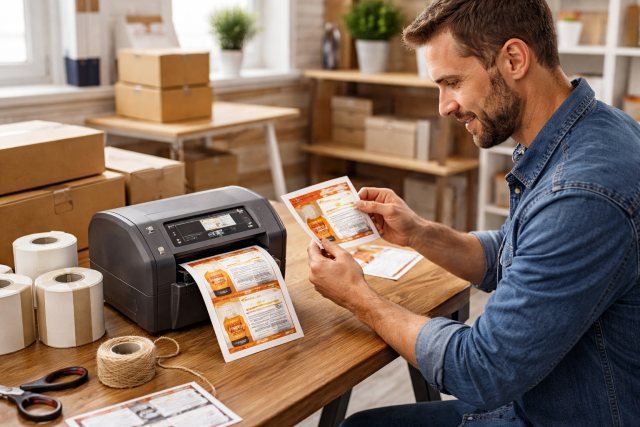
A label printer is no longer a “nice-to-have” accessory — it’s a productivity tool that directly impacts professionalism, accuracy, and operational speed. Whether you’re running an eCommerce store, organizing inventory, labeling products, or printing barcodes, a good label printer helps ensure your labels look clean, readable, and consistent.
- What Is a Label Printer?
- Why Using a Label Printer Improves Business Results
- Types of Label Printers
- 1. Direct Thermal Label Printer
- 2. Thermal Transfer Label Printer
- 3. Inkjet Label Printer
- 4. Laser Label Printer
- Label Printer Formats: Desktop vs Industrial vs Mobile
- Key Features to Look for in a Label Printer (Buyer’s Checklist)
- How to Choose the Best Label Printer for Your Use Case
- Barcode Printing: How to Get Perfect Scans Every Time
- Real-World Case Scenario: Shipping Label Efficiency Upgrade
- Maintenance Tips to Keep Your Label Printer Running Smoothly
- FAQs: Label Printer Questions People Ask
- Conclusion: Choosing the Right Label Printer for Professional Results
In fact, the global label printers market has been valued in the billions and continues growing steadily due to increasing demand in retail, logistics, and manufacturing. One report estimates the market at around USD 2.57 billion in 2024, projected to grow further over the next decade.
If you’re trying to reduce labeling errors, streamline shipping, or upgrade your branding, this guide will walk you through everything you need to know — types, features, selection tips, and best practices — to print professional labels confidently.
What Is a Label Printer?
A label printer is a specialized device designed to print labels efficiently and accurately. Unlike standard inkjet or laser printers, label printers are optimized for:
- Printing on rolls (continuous labels)
- Fast output for repetitive tasks
- Barcode and QR printing
- Durable adhesive label materials
- Consistent formatting and alignment
Some models print shipping labels only, while others can print product labels, industrial tags, QR codes, and even RFID labels.
Why Using a Label Printer Improves Business Results
Professional labels don’t just look better — they can improve workflows, customer experience, and compliance.
1. Faster Operations
Instead of manually cutting paper labels or dealing with standard printer jams, a label printer can print hundreds of labels daily with minimal interruptions — especially thermal models.
2. Better Accuracy
Shipping errors and mismatched barcodes cause delays, chargebacks, and lost revenue. Barcode quality guidelines emphasize using high-resolution artwork and printing to prevent scan failures.
3. Stronger Branding
Product labels often act as the first “physical touchpoint” with customers. Crisp labels with consistent fonts, spacing, and materials elevate trust and perceived value.
Types of Label Printers
Choosing the right label printer begins with understanding the main printer categories.
1. Direct Thermal Label Printer
A direct thermal label printer uses heat to print directly onto heat-sensitive label paper — no ink, toner, or ribbon required.
Best for:
- Shipping labels
- Warehouse routing labels
- Short-term barcode labels
Pros:
- Lower ongoing cost (no ink)
- Minimal maintenance
- Fast printing
Cons:
- Labels fade over time
- Not ideal for outdoor or long-term use
Direct thermal is commonly preferred for shipping because it’s efficient and cost-friendly compared to ink-based printing.
2. Thermal Transfer Label Printer
Thermal transfer printing uses a heated ribbon to transfer ink onto the label surface. This produces labels that last much longer and resist heat, water, and chemicals.
Best for:
- Product labeling
- Asset tags
- Chemical labels
- Industrial environments
Pros:
- Highly durable labels
- Works with more materials (polyester, polypropylene, etc.)
- Better for compliance labeling
Cons:
- Ribbon replacement adds cost
- Slightly more setup complexity
3. Inkjet Label Printer
Inkjet label printers can print full color, making them popular for marketing-driven product labels.
Best for:
- Color product labels
- Branding and packaging
- High-resolution images
Pros:
- Color printing
- Great for logos and gradients
- Professional retail-style output
Cons:
- Higher cost per label
- Ink maintenance issues
Businesses comparing inkjet vs thermal printing are often advised to consider long-term consumable costs, as thermal printing eliminates ink-related expenses.
4. Laser Label Printer
Laser printers can print sheets of labels quickly, often used in office environments. However, they’re usually less efficient for high-volume labeling compared to roll-based label printers.
Best for:
- Office labeling
- Address labels
- Low-to-medium volume needs
Pros:
- Sharp text
- Fast sheet printing
- Great for general office use
Cons:
- Not optimized for rolls
- Labels can peel or jam if misaligned
Label Printer Formats: Desktop vs Industrial vs Mobile
Even after choosing print technology, you’ll still need to match the format to your workflow:
Desktop Label Printers
Best for small businesses, online sellers, and office labeling. Compact and affordable.
Industrial Label Printers
Built for warehouses and manufacturing environments. They support higher-duty cycles and larger label rolls.
For example, the Zebra ZT411 supports multiple resolutions including 203 dpi, 300 dpi, and 600 dpi (on certain models) and is designed for industrial workloads.
Mobile Label Printers
Used by field workers, delivery teams, and retail staff for labeling on the go.
Key Features to Look for in a Label Printer (Buyer’s Checklist)
A good label printer isn’t about brand hype — it’s about matching features to your real needs.
1. Print Resolution (DPI)
- 203 DPI: Standard for shipping labels and simple barcodes
- 300 DPI: Better for small fonts and detailed barcodes
- 600 DPI: Best for tiny labels, high precision, and dense barcodes
If barcode scanning is critical, higher saying readability depends on high-quality printing and artwork resolution.
2. Print Speed
Speed matters when you’re printing 50+ labels a day.
Some modern desktop thermal printers can reach high output rates. In a TechRadar review, one thermal model supports up to 72 labels per minute, making it suitable for eCommerce shipping workflows.
3. Label Width and Compatibility
Ask:
- Does it support 4” x 6” shipping labels?
- Can it print narrow barcode labels?
- Does it handle continuous rolls?
- Does it support die-cut labels?
4. Connectivity Options
Look for:
- USB (standard)
- Bluetooth (mobile printing)
- Wi-Fi / Ethernet (shared office use)
If you plan to print labels from a phone or tablet, Bluetooth or Wi-Fi is essential.
5. Software & Template Support
The best printers have:
- Drag-and-drop label designers
- Barcode generation tools
- Integration with shipping platforms
- Template libraries for different label sizes
6. Cost of Ownership
Many buyers focus only on the price tag, but operational costs matter more over time.
Thermal printing is often considered more cost-efficient because it avoids ink and toner replacements — especially for high volume shipping labels.
How to Choose the Best Label Printer for Your Use Case
Here’s how to make a smart decision without overbuying.
If You Run an eCommerce Store
Choose a direct thermal 4” label printer:
- Prints fast
- Ideal for shipping labels
- Works with major courier formats
If You Sell Retail Products
Choose a thermal transfer or inkjet label printer:
- Durable labels
- Better for branding
- Handles different materials and finishes
If You Manage Warehouse Inventory
Choose an industrial thermal transfer label printer:
- High daily output
- Durable barcodes
- Better resistance to abrasion and moisture
If You Need On-the-Go Printing
Choose a mobile Bluetooth label printer:
- Lightweight
- Battery-powered
- Great for delivery staff and field labeling
Barcode Printing: How to Get Perfect Scans Every Time
Barcode printing is one of the biggest reasons businesses invest in a label printer. But barcode print quality depends on more than “just printing.”
GS1 recommends high-resolution printing and artwork to ensure readable barcodes and reduce scanning issues.
Common Barcode Printing Mistakes
- Low resolution printing
- Poor contrast (light gray on white)
- Shrinking the barcode height too much
- Incorrect quiet zones (white space around the code)
GS1 also highlights how barcode size, quiet zones, and contrast directly affect scan reliability.
Pro Tip: Always test barcodes with multiple scanners before mass printing product labels.
Real-World Case Scenario: Shipping Label Efficiency Upgrade
Imagine a small online store shipping 50–100 orders daily.
Before a label printer:
- Labels printed on A4 sheets
- Cut manually
- Tape required
- Higher error rate
After using a direct thermal label printer:
- One-click shipping label printing from Shopify
- Faster packing workflow
- Cleaner professional look
- Lower consumable cost (no ink)
For many small sellers, this upgrade becomes one of the fastest ROI investments.
Maintenance Tips to Keep Your Label Printer Running Smoothly
Even the best label printer needs minimal care to perform consistently.
Cleaning the Printhead
Thermal printheads can collect dust and adhesive residue. Clean with isopropyl alcohol wipes regularly (weekly for heavy use).
Use Quality Labels
Cheap thermal labels can:
- Create excessive residue
- Fade faster
- Reduce scan quality
Avoid Overheating and Overuse
Industrial printers are designed for high workloads, but desktop models may overheat if used continuously for long runs.
FAQs: Label Printer Questions People Ask
What is the best label printer for shipping labels?
A direct thermal label printer is best for shipping because it prints quickly, requires no ink or toner, and supports standard 4” x 6” courier labels.
Is a thermal label printer better than inkjet?
For shipping labels and barcodes, thermal printing is usually better because it reduces long-term costs and maintenance due to ink-free operation.
Do label printers print in color?
Some label printers, especially inkjet models, print full color. Most thermal label printers print only black.
What’s the difference between direct thermal and thermal transfer?
Direct thermal prints on heat-sensitive paper and is best for short-term use. Thermal transfer uses a ribbon and produces long-lasting, durable labels.
What DPI should I choose for barcode labels?
For most barcodes, 203 DPI is enough, but 300 DPI is better for smaller labels and detailed codes. High-resolution printing improves barcode readability.
Conclusion: Choosing the Right Label Printer for Professional Results
A label printer is one of the most practical upgrades you can make if you ship products, manage inventory, sell retail goods, or need professional branding on packaging. It saves time, reduces errors, and produces labels that look clean and consistent.
If your needs are mostly shipping and logistics, a direct thermal label printer offers the best efficiency. If you need durable product labels or long-term barcode use, thermal transfer is the smarter investment. And for vibrant branding, inkjet label printers can deliver high-impact color labels.
The key is aligning print technology, speed, connectivity, and material compatibility with your daily workflow. Once you do, your labeling process becomes faster, more reliable, and more professional — exactly what modern customers and supply chains expect.