If your organisation is sitting on old servers, desktops, or backup arrays, the data on those drives is worth more to attackers than the hardware itself. An industrial Hard Drive Shredding Machine is one of the most reliable ways to make sure that data is gone for good — far beyond the reach of recovery tools or clever hackers.
- What Is a Hard Drive Shredding Machine?
- Why Physical Shredding Matters for Data Security
- Key Features of an Industrial Hard Drive Shredding Machine
- Capacity Explained: How Much Can a Hard Drive Shredder Handle?
- Types of Hard Drive Shredding Machines
- Main Benefits of an Industrial Hard Drive Shredding Machine
- How to Choose the Right Hard Drive Shredding Machine
- Implementation Checklist for Secure Hard Drive Shredding
- Example Scenario: Data Center Decommissioning
- FAQ: Hard Drive Shredding Machines
- Conclusion: Is a Hard Drive Shredding Machine Worth It?
In this guide, we’ll break down what these machines do, the features and capacity options that actually matter, and how a hard drive shredder supports security, compliance, and operational efficiency.
What Is a Hard Drive Shredding Machine?
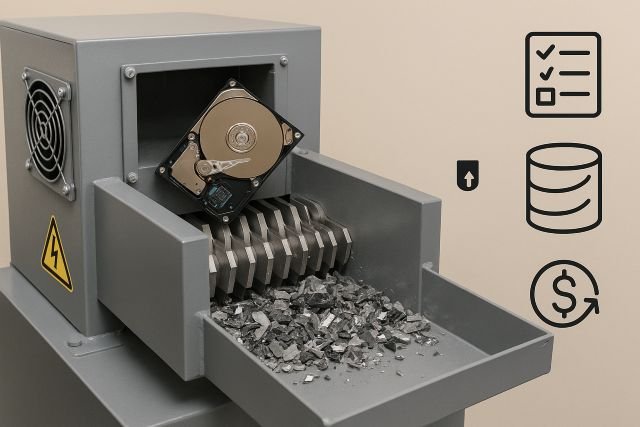
A Hard Drive Shredding Machine is a heavy-duty mechanical device that physically destroys storage media — usually by cutting, tearing, or crushing drives into small, irregular pieces.
Unlike software wiping or degaussing, shredding:
- Removes the media itself, not just the data
- Works on a wide range of drives (HDDs, SSDs, tapes, some phones and tablets, etc.)
- Produces irreversible destruction aligned with media sanitization standards like NIST SP 800-88.
For high volumes of retired IT assets, an industrial hard drive shredder can process hundreds or even thousands of drives per hour, making it ideal for data centers, ITAD providers, and large enterprises.
Why Physical Shredding Matters for Data Security
Modern data breaches are expensive and increasingly frequent. IBM’s 2024 Cost of a Data Breach report found the average global breach cost reached around USD 4.88 million, up from previous years.
Regulations like GDPR and related guidance require that personal data is not kept longer than necessary and is securely destroyed when no longer needed. That means it’s not enough to simply “delete” files or throw drives in a cupboard.
Physical shredding helps you:
- Close the loop on data lifecycle management
- Prove that you’ve sanitized or destroyed media according to recognised standards
- Reduce the chance of data resurfacing when devices are recycled, resold, or lost
NIST SP 800-88 identifies physical destruction (including shredding) as an approved method of media sanitization when data confidentiality is high or hardware is leaving organisational control.
Key Features of an Industrial Hard Drive Shredding Machine
When you’re evaluating shredders, ignore the marketing noise and focus on these core features.
1. Cutting System & Final Particle Size
Particle size is one of the most important specs of a Hard Drive Shredding Machine.
- Cutting system type: single-shaft, dual-shaft, or multi-shaft designs
- Particle size: typically measured in mm or cm (e.g., 20–40 mm chunks for drives)
- Adjustable screens or knives: allow different output sizes for HDDs vs SSDs
Smaller particle sizes generally mean higher security because it’s harder (or practically impossible) to reconstruct any part of the drive. For ultra-sensitive data (defence, government, healthcare), look for machines that meet or exceed relevant security levels and provide clear particle-size specs.
2. Throughput Capacity (Drives Per Hour)
Capacity and throughput determine whether a machine is suitable for occasional office clean-ups or round-the-clock data center operations.
Typical ranges:
- Entry/office level: 50–150 drives per hour
- Departmental: 200–500 drives per hour
- Heavy industrial: 500–3,000+ drives per hour
We’ll break this down in a moment with a comparison table.
3. Supported Media Types
A good industrial hard drive shredder usually handles more than just 3.5″ HDDs. Depending on the model, it may support:
- 2.5″ and 3.5″ HDDs
- SSDs (sometimes requiring smaller particle sizes)
- LTO tapes / backup tapes
- Optical media (CDs/DVDs), USB sticks, some mobile devices
- Metal and plastic caddies or trays
If you’re a data center or ITAD provider, choose a machine specifically rated for mixed-media shredding so you’re not constantly switching equipment.
4. Safety, Compliance & Documentation
A serious Hard Drive Shredding Machine should help you meet compliance and audit requirements, not just destroy metal.
Look for:
- Safety interlocks and emergency stop buttons
- Lockable hoppers and feeding chutes to prevent accidental contact
- Dust and noise management systems
- Support for NIST 800-88–aligned processes and certificate generation
Many organisations now require a Certificate of Destruction that includes the date, method, and personnel involved in shredding, as recommended in NIST-based guidance.
5. Automation, Integration & Workflow
For high-volume operations, automation features save huge amounts of time:
- Conveyor-fed systems for continuous shredding
- Integration with barcode or asset tracking systems
- Weighing scales and logging for chain of custody
- Remote monitoring (e.g., machine status, jam alerts)
This turns shredding from a manual, ad-hoc process into a repeatable, auditable workflow.
Capacity Explained: How Much Can a Hard Drive Shredder Handle?
Here’s a practical overview of typical capacity levels. Exact numbers vary by manufacturer, drive type, and material, but this gives you a benchmark when comparing models.
| Machine Type | Approx. Drives/Hour | Ideal Use Case |
|---|---|---|
| Office / Entry-Level | 50–150 | Small offices, branch locations, periodic clean-ups |
| Departmental | 200–500 | Mid-size companies, regional IT hubs |
| Industrial Fixed Plant | 500–1,500 | Large enterprises, hospitals, universities |
| High-Volume Plant | 1,500–3,000+ | Data centers, ITAD providers, e-waste recyclers |
When assessing capacity, think in “drives per project” terms:
- How many drives do you retire per month or per quarter?
- Do you process in batches or continuously (e.g., decommissioning a data hall)?
- Do you also want to shred tapes, SSDs, or other media on the same line?
If you regularly decommission racks of servers at once, it’s usually more cost-effective to invest in higher-throughput industrial equipment rather than running a small unit for days.
Types of Hard Drive Shredding Machines
1. Office / Room-Side Shredders
- Compact, often on wheels
- Electric-powered, plug into standard outlets
- Good for on-site destruction in office environments
These are ideal when you need occasional shredding under supervision but don’t have industrial power or floor space.
2. Mobile Truck-Mounted Shredders
- Shredders installed in mobile trucks or vans
- Service provider drives to your location and shreds drives on-site
- You watch destruction and receive immediate documentation
This is common for organisations that prefer outsourcing but still want the assurance of on-premises destruction.
3. Fixed Industrial Plant Shredders
- Large, stationary machines integrated into recycling or ITAD facilities
- Supported by conveyors, sorters, and downstream metal separation
- Designed for continuous, large-scale operation
If you run an IT asset disposition facility or large data center decommissioning program, this is typically the backbone of your media destruction line.
Main Benefits of an Industrial Hard Drive Shredding Machine
1. Security You Can Prove
Digital wiping can fail if drives are misconfigured, powered off early, or if logs are lost. A Hard Drive Shredding Machine gives you visible, physical proof that the media is gone.
Combined with:
- Asset tracking
- Certificates of Destruction
- Video or photo evidence (optional)
…you can demonstrate to auditors and regulators that data destruction is real and irreversible, supporting your overall cybersecurity strategy.
2. Regulatory Compliance (GDPR, NIST 800-88, Industry Rules)
- GDPR and similar laws require secure disposal of personal data when it’s no longer needed, and they emphasise storage limitation and the right to erasure.
- NIST SP 800-88 provides a widely recognised framework for media sanitization, including destroy methods like shredding for high-sensitivity media.
Using a shredding machine that fits these expectations, and documenting your process, helps reduce compliance risk and supports certifications (ISO 27001, PCI DSS, HIPAA-related controls, etc.).
3. Lower Breach Risk and Cost Exposure
Retired drives sitting on shelves are a silent risk. If they’re lost, stolen, or improperly recycled, the resulting breach could be extremely costly — IBM’s 2024 report estimates multi-million dollar averages per incident, with costs continuing to rise.
A structured shredding program:
- Reduces the pool of “forgotten” or “shadow” media
- Limits the impact of physical theft or insider threats
- Helps avoid the brand damage, fines, and remediation costs of a data breach
4. Operational Efficiency
Doing one-off manual destruction with drills, hammers, or disassembly is slow, inconsistent, and risky.
An industrial shredder:
- Processes drives in bulk with minimal operator effort
- Delivers consistent results and documentation every time
- Can be integrated into existing IT asset disposal workflows
Over time, this can save staff hours and reduce the operational friction of decommissioning hardware.
5. Environmental & Recycling Benefits
Most industrial shredders are part of a wider recycling pipeline:
- Ferrous and non-ferrous metals can be separated and reused
- Plastics can be recycled where local facilities allow
- You comply with e-waste regulations while still ensuring destruction
This supports both sustainability goals and CSR reporting, without compromising on security.
How to Choose the Right Hard Drive Shredding Machine
Use this simple framework when comparing models and vendors.
Step 1: Define Your Volumes and Media Types
- Drives per month/quarter/year
- Mix of HDDs, SSDs, tapes, mobile devices
- Need for on-site vs off-site shredding
If you primarily handle SSDs or very sensitive data, you may require smaller particle sizes than a basic HDD shredder provides.
Step 2: Match Capacity and Duty Cycle
Ask vendors to specify:
- Drives per hour for your drive types
- Recommended duty cycle (how long it can run continuously)
- Expected maintenance schedule
Avoid undersizing the machine — running at 100% load all day accelerates wear and downtime.
Step 3: Check Compliance & Certifications
Verify that:
- The machine and destruction process align with NIST 800-88 or equivalent standards
- The vendor offers Certificates of Destruction and clear documentation
- You can incorporate shredding into your information security policy and data retention policy
Step 4: Evaluate Safety, Footprint, and Utilities
- Physical space, floor loading, and access requirements
- Power supply (3-phase vs standard mains)
- Noise and dust control
- Safety features (guards, interlocks, emergency stops)
For offices and high-traffic environments, quieter, enclosed systems may be worth the extra investment.
Step 5: Consider Total Cost of Ownership (TCO)
Don’t just compare purchase price. Include:
- Maintenance contracts and replacement knives
- Energy usage
- Downtime costs if the machine fails
- Possible revenue or savings from in-house destruction vs outsourcing
Sometimes a slightly more expensive machine with lower maintenance and better support is cheaper over 5–7 years.
Implementation Checklist for Secure Hard Drive Shredding
When you roll out or upgrade your shredding program:
- Map your data lifecycle and identify when drives should be removed from service
- Create a media inventory and tracking process (barcodes, serials)
- Define roles and responsibilities for shredding and witnessing
- Integrate shredding into your IT Asset Disposition (ITAD) policy
- Capture logs, certificates, and reports for audits
- Train staff on safety procedures and regulatory requirements
Link this from or to related internal pages like [IT Asset Disposition (ITAD) Services], [Data Destruction Policy], and [Risk Management & Compliance] to strengthen internal linking and user journeys.
Example Scenario: Data Center Decommissioning
A regional data center is shutting down a hall and decommissioning:
- 4,000+ HDDs
- 2,000 SSDs
- Several hundred backup tapes
Instead of shipping drives off-site, they install a fixed industrial Hard Drive Shredding Machine in a secure room:
- Drives are scanned, logged, and fed via conveyors
- Shredding output feeds into metal separation for recycling
- Certificates of Destruction are automatically generated per batch
Result: the organisation de-risks relocation, supports NIST-aligned sanitization, and simplifies audits when regulators or customers ask “What happened to those drives?”.
FAQ: Hard Drive Shredding Machines
1. What is a hard drive shredding machine?
A Hard Drive Shredding Machine is an industrial device that physically destroys storage media — such as HDDs and SSDs — by shredding them into small pieces so data cannot be recovered, supporting secure media sanitization and compliance.
2. Is shredding better than wiping a hard drive?
For many organisations, yes. Software wiping can be effective if done correctly, but it depends on drive health, proper procedures, and logging. Shredding removes the media entirely, making recovery practically impossible and simplifying proof of destruction for audits.
3. What particle size do I need?
For typical corporate data, shredding drives into 20–40 mm particles is often sufficient. Highly regulated sectors (government, defence, some healthcare) may require smaller particles or specific standards. Always align particle size with your risk level and regulatory framework.
4. Can a Hard Drive Shredding Machine destroy SSDs?
Yes — if the machine is rated for SSDs. Because SSDs store data differently from HDDs, many organisations aim for smaller particle sizes when shredding SSDs. Check the manufacturer’s specification for SSD handling.
5. How much does an industrial hard drive shredder cost?
Costs vary widely depending on capacity and features — from smaller office units to large plant-based systems. Instead of focusing only on purchase price, evaluate total cost of ownership and compare it with the costs and risks of breaches, which can average millions per incident.
6. Do I need to shred drives on-site?
On-site shredding provides the highest control and visibility, but many organisations use trusted ITAD or shredding providers with mobile trucks or secure off-site plants. Whichever you choose, ensure you have chain-of-custody documentation, audited processes, and clear contracts.
Conclusion: Is a Hard Drive Shredding Machine Worth It?
If your organisation handles sensitive data at scale, an industrial Hard Drive Shredding Machine is one of the most effective tools you can invest in. It transforms end-of-life media from a lingering security risk into verifiable, auditable destruction, aligned with frameworks like NIST 800-88 and data protection laws that demand secure disposal.
By choosing the right features, capacity, and workflow, you can:
- Reduce breach risk and potential multi-million-dollar losses
- Simplify compliance with GDPR and other regulations
- Streamline IT asset disposition and recycling
- Demonstrate strong E-E-A-T through transparent, documented data destruction
Build this guide into your site with smart internal links, FAQs, and optimised images, and you’ll not only help readers make better decisions — you’ll give your Hard Drive Shredding Machine page the best chance to rank and convert.