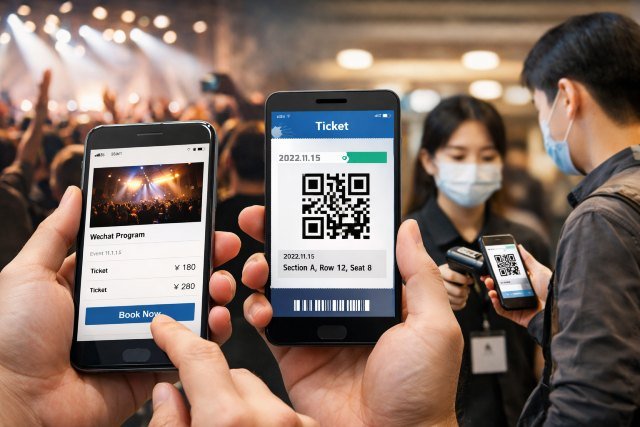
If you’ve ever attended a concert, exhibition, conference, or museum in China, you’ve likely seen the same flow: open WeChat, tap a Mini Program, pay in seconds, and walk in by scanning a QR code. That’s the essence of how WeChat Mini Program Ticketing Events Work — a ticketing journey designed to be frictionless because it lives inside the country’s most used “super-app.”
- What “WeChat Mini Program ticketing” actually means in China
- How WeChat Mini Program Ticketing Events Work: the end-to-end flow
- Why QR entry is the default in China (and why it usually works)
- Real-name ticketing: what attendees should expect
- A real-world scenario: buying and entering a Shanghai exhibition
- Common failure points (and how good events avoid them)
- FAQs
- Conclusion: why this model dominates Chinese event operations
This isn’t just convenience for attendees. For organizers, Mini Program ticketing is an end-to-end operating system for event growth, payments, identity compliance, and entry control, all inside one ecosystem. Tencent reported 1.385 billion combined monthly active users for Weixin/WeChat at the end of December 2024, which helps explain why ticketing inside WeChat is often the default instead of a separate app.
You’ll see the complete lifecycle: how users find events, how booking and WeChat Pay checkout typically work, why real-name rules matter, how QR entry validation runs on-site, and what best practices keep conversion high and queues short.
What “WeChat Mini Program ticketing” actually means in China
A WeChat Mini Program is a lightweight app that runs inside WeChat — no separate download, no separate login flow, and usually no need to re-enter payment details if you already use WeChat Pay. That “no new app” factor matters because it reduces drop-off in the most fragile part of ticketing: the first minute.
Ticketing Mini Programs are usually built in one of two ways. Some are “owned” by organizers (a venue, promoter, or brand builds their own Mini Program). Others are “platform” Mini Programs (a ticketing marketplace provides Mini Program storefronts for many events). In both cases, the user experience is similar: browse, select, pay, receive a QR credential, and scan at entry.
The key difference from many Western flows is that the ticket often isn’t a PDF email attachment. It’s an account-linked credential that stays inside WeChat, and it’s validated digitally at the gate.
How WeChat Mini Program Ticketing Events Work: the end-to-end flow
Step 1: Discovery happens where people already spend time
In China, event discovery is commonly social-first and feed-first. People find events from WeChat Moments, group chats, Official Accounts, video/creator channels, or offline posters with a Mini Program QR code.
That “offline poster to Mini Program” path is powerful because it creates a clean bridge from physical marketing to digital conversion. A user scans, lands directly on the event page, and can purchase immediately without app-store friction.
From an organizer perspective, this is where Mini Programs shine: your “ad” and your “checkout” can be the same experience — one environment, one identity system, one payment rail.
Step 2: Lightweight login and identity context
Mini Programs typically use WeChat’s user identity context (commonly based on OpenID/UnionID patterns in the WeChat ecosystem) so the “account” step feels invisible. Users aren’t thinking, “I’m creating a new ticketing account.” They’re simply continuing as themselves inside WeChat.
For higher-risk events (high-demand concerts, large commercial performances), the flow may add real-name verification steps. This could mean collecting name and ID information, binding a ticket to a person, or validating the attendee identity at entry depending on the event type and local requirements.
China’s regulators have pushed a “real-name purchase and real-name entry” approach for large commercial performances (notably those over 5,000 attendees), and Chinese state media reported requirements such as identity consistency between buyer and entrant, limits like one ID per ticket, and rules around public ticket allocation and binding windows.
Step 3: Selecting ticket type, seat, or time slot
The ticket selection experience varies by category:
Concerts and sports may include seat maps, tiered pricing, and strict ticket limits per account/ID.
Museums and attractions often use time-slot booking to control capacity.
Conferences may sell passes (single-day, multi-day, VIP) with add-ons like workshops.
A well-built Mini Program keeps this screen fast, mobile-friendly, and explicit about key constraints: refund rules, ID requirements, entry time windows, and whether transfer is allowed.
Step 4: WeChat Pay checkout (where conversion is usually won)
WeChat Pay is often the conversion engine behind Mini Program ticketing. In practice, ticketing systems create an order, then call WeChat Pay to generate a payment session identifier (commonly referred to as a prepay_id in the WeChat Pay flow). WeChat Pay’s merchant documentation describes this JSAPI/Mini Program payment scenario and the creation of a prepay transaction session used to initiate payment.
What this means in real life is simple: for users already set up with WeChat Pay, payment can feel like “one confirmation,” not a multi-field checkout. That reduces abandonment, especially during peak demand drops when every second and every extra tap loses buyers.
Step 5: Ticket issuance inside WeChat (QR code or credential)
After payment success, the Mini Program typically issues a ticket credential that lives in one of these places:
Inside the Mini Program’s “My Orders / My Tickets” screen
As a QR code displayed on-screen at entry time
Sometimes mirrored via in-app notifications so users can quickly find it again
Unlike email-based tickets, the credential is tied to the WeChat identity context and event order record, which helps reduce casual forwarding and makes it easier to run real-name enforcement.
Step 6: Pre-event reminders and last-mile instructions
The best Mini Program ticketing experiences treat “buying” as only half the job. The other half is getting the person to the venue with the right expectations and the right QR ready.
Reminders may include gate opening times, venue rules, ID requirements, and directions. Many organizers also use subscription or service notifications so users can opt in to receive updates, but these must be user-consented and configured according to Mini Program messaging rules (often involving template configuration in the Mini Program backend).
Step 7: On-site entry: QR scan → server validation → access decision
At the venue, entry usually looks like this:
A staff device (or a turnstile scanner) scans the attendee’s QR code.
The scanning device sends the code or token to the ticketing backend.
The backend checks status (valid/unused), event/time window, ticket type, and sometimes identity binding.
The system returns an allow/deny response in real time.
If allowed, the ticket is marked “used” immediately to prevent re-entry or duplication.
This “mark used at scan” pattern is one reason QR entry is so effective at scale. It turns admission control into a real-time database decision rather than a visual inspection problem.
Step 8: Post-event follow-up that doesn’t feel spammy
Because the ticket lives inside WeChat, post-event engagement can be done with less friction: feedback, photo drops, membership offers, next-event pre-sales, or brand follow-ups.
The key is restraint. Users tolerate WeChat-based communications when it’s clearly connected to a real transaction they initiated. They churn when it becomes generic blasting.
Why QR entry is the default in China (and why it usually works)
QR codes are not “new” in China — they’re infrastructural. The combination of ubiquitous smartphone scanning behavior, dense urban event demand, and an ecosystem already optimized for mobile payments makes QR ticket entry feel natural.
Operationally, QR entry solves three persistent problems:
It reduces counterfeit risk because the code resolves to a live validation decision, not a static image.
It scales staffing because one scanner can process many people quickly.
It creates real-time attendance data, which is valuable for safety, reporting, and marketing attribution.
And when real-name enforcement is required, QR-based systems make it easier to bind identity data to a ticket record and enforce “one person, one entry” rules at the point of access, not just at purchase.
Real-name ticketing: what attendees should expect
If you’re buying tickets in China — especially for high-demand concerts — you may see “实名制” (real-name system) steps. The flow commonly includes entering name and ID details, and sometimes binding each ticket to a specific attendee before entry.
Chinese reports around performance market management have described stronger real-name policies for large commercial performances, including identity consistency between purchase and entry and public ticket allocation thresholds.
For users, the practical takeaway is: don’t assume you can freely transfer a ticket to a friend at the last minute. For organizers, the takeaway is: you must design the UX to explain real-name rules in plain language, or you’ll create customer support chaos on event day.
A real-world scenario: buying and entering a Shanghai exhibition
Imagine an art exhibition in Shanghai using a Mini Program for timed entry.
You scan a poster QR at a mall entrance and land on the Mini Program event page.
You choose Saturday 3:00–4:00 PM, select two tickets, and confirm visitor names.
You pay via WeChat Pay in seconds (no card forms, no separate wallet app).
You receive a ticket screen with a dynamic QR code.
At the venue, staff scans your QR, the backend confirms it’s within the time slot and unused, and your entry is approved instantly.
From the user’s perspective, there are no “handoffs” between apps. From the operator’s perspective, capacity is controlled by time-slot inventory and validated at the gate, not by manual counting.
Common failure points (and how good events avoid them)
The QR loads slowly at the gate
This often happens when the Mini Program is heavy, networks are overloaded, or the ticket screen requires multiple taps to reach.
Better events cache a “Ticket” shortcut on the home screen, simplify the ticket UI, and ensure that staff can also validate via order lookup in edge cases.
Confusion about real-name rules
If the rules are buried in fine print, expect arguments at entry. The fix is a clear, repeated explanation at three moments: before payment, after payment, and in the pre-event reminder.
Refund policies feel unclear
Ticketing is trust. If refunds are unclear, users hesitate. If refunds are too loose, scalpers exploit them. Strong ticketing Mini Programs set expectations upfront and align policy with platform and regulatory guidance.
FAQs
What are WeChat Mini Programs used for in event ticketing?
They’re used to host the entire ticketing journey inside WeChat: event discovery, ticket selection, WeChat Pay payment, ticket storage, reminders, and QR-based entry validation. This reduces friction because users don’t need to install a new app or create a new account.
Do I need a separate ticketing app to attend events in China?
Often, no. Many events prefer WeChat Mini Programs because they keep the user inside WeChat and connect directly to WeChat Pay for fast checkout.
How does QR entry work at the venue?
Your Mini Program displays a QR code tied to your order. Staff scans it, the system checks validity in real time (unused, correct event, correct time window), and then marks it used to prevent duplication.
Why do some events require real-name information?
China has strengthened management rules for large commercial performances, and real-name purchase and real-name entry requirements are designed to reduce scalping and improve safety and accountability for high-capacity events.
Is WeChat Mini Program payment secure?
Payments are handled through WeChat Pay’s merchant transaction flow, where the merchant creates a payment session used to initiate payment inside the WeChat environment.
Conclusion: why this model dominates Chinese event operations
The reason WeChat Mini Program Ticketing Events Work so well in China is that they combine three things into one continuous flow: attention (people already live in WeChat), transaction (WeChat Pay makes checkout fast), and access (QR validation turns entry into a real-time decision). Tencent’s reporting of 1.385 billion combined MAU for Weixin/WeChat underscores why building ticketing inside this ecosystem is often the most practical route for scale.
For attendees, the best advice is to treat your WeChat Mini Program ticket as your “event passport”: keep the ticket screen easy to reach, follow real-name instructions when present, and arrive with your QR ready. For organizers, the playbook is to design for speed, clarity, and compliance — because when your booking flow and your entry gates are both inside WeChat, every tap you remove and every rule you explain clearly translates into shorter lines, fewer disputes, and higher conversion.