
Learning programming can be challenging, especially for beginners who struggle with complex syntax, abstract concepts, and traditional coding environments. Greenfoot Software provides a unique approach by combining programming education with interactive visual development, allowing students and new developers to create games, simulations, and graphical applications while learning Java.
- What Is Greenfoot Software?
- How Greenfoot Software Helps Students Learn Programming
- Why Developers Use Greenfoot Software for Learning Java Concepts
- Key Features That Make Greenfoot Software Different
- Greenfoot Software vs Traditional Coding Environments
- Practical Applications of Greenfoot Software in Education and Development
- How to Install Greenfoot Software
- Learning Greenfoot Software: Tips for Beginners
- Greenfoot Software Compared With Other Coding Platforms
- Is Greenfoot Software Still Relevant for Modern Programming Education?
- Common Challenges When Using Greenfoot Software
- Expert Tips for Getting Better Results With Greenfoot Software
- Future Outlook of Greenfoot Software in Programming Education
- How Greenfoot Software Supports the Future of Coding Skills
- Final Insights: Why Greenfoot Software Remains Valuable
- Conclusion: Why Students and Developers Choose Greenfoot Software
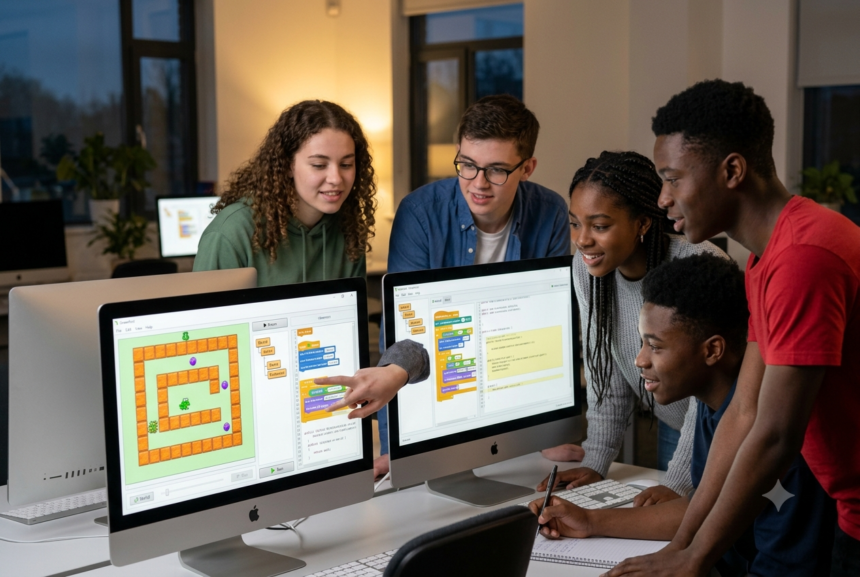
Unlike conventional coding tools that focus only on text-based programming, Greenfoot creates a visual environment where users can immediately see the results of their code. This makes programming more engaging and easier to understand for students, educators, and anyone starting their software development journey.
Developed as an educational programming environment, Greenfoot Software is widely used in schools, universities, and coding programs around the world. Its interactive features help learners understand object-oriented programming concepts through practical experience rather than only theoretical lessons.
What Is Greenfoot Software?
Greenfoot Software is an interactive Java-based programming environment designed primarily for teaching and learning object-oriented programming. It allows users to create two-dimensional simulations, animations, and games by working with visual objects inside a simple development interface.
The platform was created by researchers at the University of Kent and Deakin University to make programming education more accessible. Instead of beginning with complicated professional development tools, beginners can focus on learning programming logic, classes, objects, inheritance, and behavior through creative projects.
Greenfoot uses a visual world where programmers can place and control objects. For example, students can create a virtual environment containing characters, animals, vehicles, or interactive elements and then write Java code to control their actions.
This practical learning method helps connect programming concepts with real-world results.
How Greenfoot Software Helps Students Learn Programming
One of the biggest advantages of Greenfoot Software is its ability to simplify programming education. Many beginners lose interest because traditional programming lessons often start with abstract concepts that seem disconnected from practical applications.
Greenfoot changes this experience by allowing students to immediately build visible projects.
A beginner learning Java can create a simple game character and write code that controls movement, reactions, and interactions. Through this process, students naturally learn important programming principles such as variables, methods, loops, conditions, and object relationships.
For teachers, Greenfoot provides a classroom-friendly environment where programming lessons can become more interactive. Students can experiment, make mistakes, test ideas, and improve their projects without feeling overwhelmed by professional-level development tools.
Research in computer science education has shown that visual programming environments can improve learner engagement because they provide immediate feedback and encourage experimentation. Educational platforms like Greenfoot support active learning approaches where students learn by creating rather than memorizing.
Why Developers Use Greenfoot Software for Learning Java Concepts
Although Greenfoot Software is mainly designed for education, it is also valuable for developers who want to strengthen their Java programming skills.
Modern software development requires a strong understanding of object-oriented programming. Greenfoot provides a practical environment for practicing these concepts through interactive applications.
Developers can use Greenfoot projects to experiment with:
- Java classes and objects
- Inheritance structures
- Event-based programming
- Game development logic
- Animation systems
- Simulation models
For example, a beginner Java developer interested in game programming can build a small 2D project in Greenfoot to understand how characters interact, how game mechanics work, and how different objects communicate with each other.
This type of hands-on practice can create a stronger foundation before moving into advanced Java frameworks and professional development environments.
Key Features That Make Greenfoot Software Different
Visual Programming Environment
The visual interface is one of the main reasons educators choose Greenfoot Software. Users can see objects placed inside a world and observe how their code changes object behavior.
This visual connection helps beginners understand programming concepts that may otherwise feel confusing.
For example, instead of only reading about inheritance, students can create a parent class and child classes and observe how different objects inherit characteristics and behaviors.
Interactive Object-Based Learning
Greenfoot is built around object-oriented programming principles. Every element inside a project can represent an object with specific properties and actions.
A student creating a wildlife simulation might create objects such as birds, trees, and animals. Each object can have unique behaviors controlled through Java code.
This approach mirrors real software development, where programmers design systems using interacting objects.
Built-In Scenario Creation Tools
Greenfoot Software allows learners to create complete scenarios without needing additional graphics engines or complex programming libraries.
Students can design simple games, educational simulations, and interactive demonstrations while focusing on programming concepts.
This makes Greenfoot especially useful for:
- High school computer science classes
- University programming courses
- Coding workshops
- Independent learners
Greenfoot Software vs Traditional Coding Environments
Traditional programming environments such as professional Java IDEs provide powerful features, but they can be intimidating for beginners.
Tools like advanced integrated development environments often require users to understand project structures, configuration settings, libraries, and debugging systems before writing meaningful programs.
Greenfoot Software removes many early barriers by providing a simplified environment focused on learning.
The main difference is that Greenfoot emphasizes creativity and experimentation, while professional IDEs prioritize large-scale software development.
However, Greenfoot is not intended to replace professional development tools. Instead, it acts as a stepping stone that helps beginners develop confidence before moving to advanced programming environments.
Major Benefits of Using Greenfoot Software for Programming Education
The popularity of Greenfoot Software comes from its ability to make programming more practical, visual, and enjoyable. Instead of learning programming concepts through only textbooks and examples, students can build interactive projects that demonstrate how code works in real situations.
One important benefit is increased learner engagement. When students create a game character, simulation, or animation, they can immediately see the results of their programming decisions. This feedback encourages experimentation and helps learners understand mistakes as part of the development process.
Greenfoot Software also reduces the fear that many beginners experience when starting programming. A professional coding environment can appear complicated because of numerous menus, settings, and technical options. Greenfoot provides a simpler workspace where beginners can focus on understanding programming logic.
Another advantage is that it teaches concepts that remain useful beyond the platform. Students learn Java syntax, object-oriented design, problem-solving techniques, and computational thinking skills that can transfer to other programming environments.
Practical Applications of Greenfoot Software in Education and Development
Although Greenfoot Software is mainly associated with programming education, it has many practical applications that demonstrate real software development concepts.
Creating Educational Games
One of the most common uses of Greenfoot is building simple interactive games. Students can create games involving characters, obstacles, scoring systems, and user interactions.
For example, a beginner may create a game where a player controls a character moving through a virtual environment. While developing the project, they learn about keyboard input, object movement, collision detection, and game logic.
This approach transforms programming from a theoretical subject into a creative activity.
Building Scientific and Mathematical Simulations
Greenfoot Software is also useful for creating simulations that represent real-world systems.
Students can develop projects that demonstrate concepts such as:
- Animal movement patterns
- Traffic simulations
- Environmental systems
- Physics experiments
- Mathematical models
For example, a science student could create a simulation showing how different objects move under specific conditions. By changing variables and observing outcomes, learners gain a deeper understanding of both programming and scientific concepts.
Teaching Object-Oriented Programming
Object-oriented programming is one of the most important concepts in modern software development. However, many beginners find concepts such as classes, objects, and inheritance difficult.
Greenfoot Software makes these ideas easier by visually representing objects inside a programming environment.
A teacher can demonstrate inheritance by creating a basic class and extending it into different types of objects. Students can then observe how shared behaviors and unique characteristics work together.
This practical demonstration helps bridge the gap between programming theory and application.
How to Install Greenfoot Software
Installing Greenfoot Software is a straightforward process because it is designed for beginners and educational environments.
Users can download the software from the official Greenfoot website and select the version compatible with their operating system. The platform supports major systems, including Windows, macOS, and Linux.
Before installation, users should ensure that Java is available on their computer because Greenfoot is built around Java technology.
After installation, beginners can open sample projects included with the software to understand how scenarios, objects, and code interact.
The official Greenfoot documentation provides tutorials and examples that help new users create their first projects.
Learning Greenfoot Software: Tips for Beginners
Starting with programming can feel challenging, but using the right learning approach can make the process much easier.
The first step is understanding basic Java concepts before attempting complex projects. Beginners should learn about variables, methods, classes, and object behavior gradually.
Creating small projects is another effective learning strategy. Instead of trying to build a large game immediately, learners should begin with simple tasks such as moving an object across the screen or changing an object’s appearance.
Experimentation is also important. Greenfoot Software encourages users to modify existing examples, test different ideas, and observe the results.
For students, working on creative projects can make learning more enjoyable. Building something personally interesting, such as a simple game or simulation, often increases motivation and improves understanding.
Greenfoot Software Compared With Other Coding Platforms
Many programming education platforms exist today, but each has a different purpose. Understanding these differences helps learners choose the right tool.
Greenfoot Software vs Scratch
Scratch is a popular beginner programming platform that uses block-based coding. It is excellent for introducing children to programming concepts without requiring syntax knowledge.
Greenfoot, however, focuses on Java programming and introduces learners to real coding practices earlier. While Scratch users connect blocks visually, Greenfoot users write actual Java code.
For students moving from beginner concepts toward professional programming, Greenfoot can provide a smoother transition.
Greenfoot Software vs Professional Java IDEs
Professional Java development environments such as Eclipse IDE and IntelliJ IDEA offer advanced features used by professional developers.
These tools provide powerful debugging, project management, and development capabilities, but they can overwhelm beginners.
Greenfoot Software focuses on learning fundamentals before introducing the complexity of professional software development environments.
Is Greenfoot Software Still Relevant for Modern Programming Education?
Despite the growth of modern coding platforms and online learning tools, Greenfoot Software remains valuable because it focuses on fundamental programming skills.
Programming languages and technologies continue changing, but concepts such as logical thinking, object-oriented design, and problem-solving remain essential.
Many educational institutions still use interactive programming environments because they help students develop confidence and curiosity.
The goal of Greenfoot is not to teach every aspect of professional software engineering. Instead, it provides a strong foundation that prepares learners for more advanced programming challenges.
Common Challenges When Using Greenfoot Software
While Greenfoot provides many advantages, beginners may experience some challenges.
One limitation is that Greenfoot mainly focuses on Java and 2D interactive projects. Developers interested in web development, mobile applications, artificial intelligence, or advanced software engineering will eventually need to learn additional technologies.
Another challenge is that students may become comfortable with Greenfoot’s simplified environment and need time to adjust to professional development tools.
However, these limitations are expected because Greenfoot is designed as a learning platform rather than a complete professional development solution.
The best approach is to use Greenfoot as a foundation and gradually expand programming knowledge.
Expert Tips for Getting Better Results With Greenfoot Software
To gain maximum value from Greenfoot Software, learners should focus on building projects rather than only completing tutorials.
Creating original projects encourages deeper understanding because users must plan, solve problems, and make programming decisions independently.
Students should also study existing Greenfoot scenarios created by other users. Examining different coding approaches helps develop better programming habits.
Teachers can improve learning outcomes by combining Greenfoot projects with discussions about software design, algorithms, and real-world applications.
FAQs About Greenfoot Software
What is Greenfoot Software used for?
Greenfoot Software is used for teaching and learning Java programming through interactive visual projects. It allows students and beginners to create games, simulations, animations, and object-based applications while practicing programming concepts.
The platform is especially useful for understanding object-oriented programming because users can create objects, define behaviors, and observe how code affects visual elements in real time.
Is Greenfoot Software free to use?
Yes, Greenfoot Software is available as a free educational programming environment. Students, teachers, and independent learners can download and use it for learning Java programming without purchasing expensive development tools.
Its free availability makes it accessible for schools, coding clubs, and individuals who want to explore programming fundamentals.
Do I need Java knowledge before using Greenfoot Software?
No, beginners do not need advanced Java knowledge before starting with Greenfoot Software. The platform is designed for learners who are new to programming.
However, understanding basic programming ideas such as variables, conditions, and methods can make the learning process easier. Many users learn Java concepts gradually while creating Greenfoot projects.
Can Greenfoot Software be used for professional software development?
Greenfoot Software is primarily designed for education rather than professional software production. It is not intended to replace advanced development environments used by experienced programmers.
However, developers can use Greenfoot to practice Java concepts, test ideas, and improve their understanding of object-oriented programming before working on larger applications.
What types of projects can be created with Greenfoot Software?
Users can create many different interactive projects with Greenfoot Software, including:
- Simple Java games
- Educational simulations
- Interactive demonstrations
- Animation projects
- Virtual environments
- Programming experiments
The platform provides enough flexibility for beginners to explore creativity while developing coding skills.
Is Greenfoot Software suitable for children?
Greenfoot Software can be suitable for younger learners, especially those who already have some programming interest. While it is not as beginner-focused as block-based platforms, it introduces students to real programming syntax.
Many schools use Greenfoot with teenagers and university students because it provides a balance between simplicity and real coding experience.
Future Outlook of Greenfoot Software in Programming Education
The future of programming education continues moving toward interactive, project-based learning. As technology becomes more important in schools and workplaces, students need opportunities to develop practical coding skills rather than only memorize programming concepts.
Greenfoot Software remains relevant because it supports this hands-on learning approach. The platform helps learners understand programming through experimentation, creativity, and problem-solving.
With increasing demand for software development skills, educational tools that simplify programming concepts will continue playing an important role. Platforms like Greenfoot provide an accessible entry point for students who may later explore advanced areas such as artificial intelligence, web development, mobile applications, and software engineering.
The rise of visual learning and interactive education also supports the continued use of environments that allow students to immediately see the impact of their code.
How Greenfoot Software Supports the Future of Coding Skills
Programming education is changing from traditional classroom instruction toward more practical learning experiences. Students today benefit from tools that allow them to build, test, and improve projects independently.
Greenfoot Software supports this trend by encouraging computational thinking. Learners do not simply follow instructions; they analyze problems, design solutions, and create working applications.
These skills are valuable beyond programming. Logical thinking, creativity, and structured problem-solving are useful in many professional fields.
As more industries depend on technology, early exposure to programming concepts can help students prepare for future career opportunities.
Final Insights: Why Greenfoot Software Remains Valuable
Learning programming requires more than memorizing commands and syntax. Successful programmers need creativity, patience, problem-solving abilities, and practical experience.
Greenfoot Software provides an environment where beginners can develop these skills through interactive projects. Its visual approach makes programming concepts easier to understand while introducing learners to real Java development practices.
Students benefit from the platform because they can experiment without the complexity of professional tools. Teachers benefit because they can create engaging programming lessons. Developers benefit because it provides a simple environment for practicing object-oriented concepts.
Although Greenfoot is not designed to replace professional programming tools, it serves an important purpose as a learning bridge between beginner coding and advanced software development.
For anyone starting their programming journey, Greenfoot Software offers an effective way to understand how code creates actions, behaviors, and interactive experiences.
Conclusion: Why Students and Developers Choose Greenfoot Software
Greenfoot Software continues to be a valuable interactive coding platform because it transforms programming education into a creative and practical experience. By combining Java programming with visual development, it helps learners understand difficult concepts through real examples.
Students can use Greenfoot to build games, simulations, and educational projects while developing essential programming skills. Developers can use it to strengthen their understanding of object-oriented programming before moving toward advanced development environments.
The platform’s simplicity, educational focus, and project-based approach make it a powerful starting point for anyone interested in programming.
As technology education continues evolving, tools like Greenfoot Software will remain important because they encourage curiosity, experimentation, and the ability to turn ideas into working digital creations.