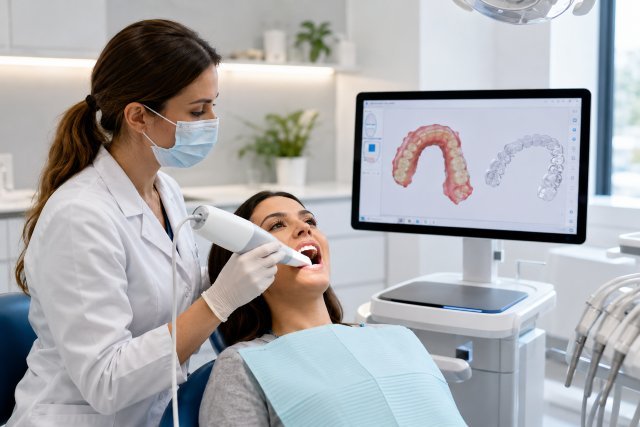
Trios 5 Invisalign Compatibility is an important question for dental clinics investing in digital dentistry, orthodontic workflows, and clear aligner case submissions. TRIOS 5 is a modern 3Shape intraoral scanner with strong digital scanning features, but Invisalign submission compatibility depends on more than scan quality alone. Clinics must consider region, scanner approval status, provider certification, and Align Technology’s accepted submission pathways.
- What Trios 5 Invisalign Compatibility Really Means
- Is TRIOS 5 Directly Compatible With Invisalign?
- Why Compatibility Varies by Country
- Trios 5 Invisalign Compatibility for U.S. Dental Clinics
- Trios 5 Invisalign Compatibility Outside the U.S.
- How the 3Shape Invisalign Integration Works
- Practical Workflow Options for Clinics Using TRIOS 5
- What Dental Clinics Should Check Before Buying TRIOS 5
- Common Problems Clinics Face With Invisalign Scanner Compatibility
- Real-World Example: A Clinic Planning Invisalign Growth
- Actionable Tips for a Smooth Digital Aligner Workflow
- FAQs About Trios 5 Invisalign Compatibility
- Conclusion
For many practices, the biggest mistake is assuming that every advanced intraoral scanner can automatically send Invisalign cases. In reality, Invisalign workflows are controlled by Align Technology’s interoperability rules. Align states that Invisalign clear aligner cases can be submitted through physical impressions or intraoral scans from iTero scanners and certain third-party scanners that have approved interoperability with Align’s systems.
That means TRIOS 5 may be an excellent scanner for digital dentistry, restorative workflows, patient communication, and some orthodontic planning, but clinics should verify whether it is approved for direct Invisalign submission in their specific market before building their aligner workflow around it.
What Trios 5 Invisalign Compatibility Really Means
In simple terms, Trios 5 Invisalign Compatibility refers to whether a clinic can use scans from a 3Shape TRIOS 5 scanner to submit Invisalign cases directly through the approved Invisalign workflow.
This is not only a hardware question. It is also a software, certification, account, and country-approval question.
A scanner may capture accurate digital impressions, but Invisalign case submission requires a recognized connection between the scanner ecosystem and Align Technology’s systems. 3Shape’s own support guidance for Invisalign integration says clinics need an approved TRIOS scanner, a 3Shape Communicate registration, an official Invisalign provider account, and completed mandatory training with certification.
The key point for clinics is this: digital scan quality and Invisalign submission approval are not the same thing. A scanner can be clinically useful and still not be accepted for a specific Invisalign submission route.
Is TRIOS 5 Directly Compatible With Invisalign?
Based on currently available official 3Shape support information, clinics should be careful about assuming that TRIOS 5 is directly accepted for Invisalign case submission.
3Shape’s support article on enabling Invisalign integration says the approved TRIOS scanners are “only P12, P13 and TRIOS 3.” It also states that the clinic must be an official Invisalign Provider, have a registered Invisalign account, and complete the required training and certification process.
This makes the practical answer nuanced. TRIOS 5 is part of the current 3Shape TRIOS scanner portfolio, and 3Shape describes TRIOS 5 as “Intelligent. Acclaimed technology.” in its scanner comparison page. However, Invisalign direct submission depends on the approved scanner list and regional rules, not just whether the scanner is newer or more advanced.
For a dental clinic, the safest interpretation is that TRIOS 5 should not be purchased solely for direct Invisalign submission unless your reseller, 3Shape support, and Align/Invisalign account representative confirm that your exact scanner, software setup, and country are supported.
Why Compatibility Varies by Country
One reason clinics get confused is that Invisalign compatibility with TRIOS scanners has changed by region over time.
Align Technology announced in 2017 that it would discontinue acceptance of digital scan submissions from 3Shape TRIOS scanners in the United States for new Invisalign treatment and retention cases, effective January 31, 2018. The same announcement said non-U.S. Invisalign customers were not affected by that patent-related litigation at the time.
Current 3Shape support guidance also lists countries where TRIOS scans are not approved for Invisalign, including the United States, China, Japan, Puerto Rico, Guam, and several other territories.
This is why clinics in the UK, Europe, Canada, Australia, the Middle East, or other markets should not rely on U.S.-based discussions alone. At the same time, U.S. clinics should not rely on older global TRIOS-Invisalign marketing pages without checking the latest local rules.
Trios 5 Invisalign Compatibility for U.S. Dental Clinics
For U.S.-based dental clinics, Trios 5 Invisalign Compatibility is especially limited.
The official 3Shape support page lists the United States among the countries where TRIOS scans are not approved for Invisalign integration. Align’s 2017 announcement also specifically addressed the discontinuation of new Invisalign scan submissions from TRIOS scanners in the United States.
In practical terms, a U.S. clinic using TRIOS 5 may still use the scanner for many digital workflows, but it should not assume direct Invisalign case submission from TRIOS 5. The clinic may need to use an iTero scanner, submit physical impressions where available, or check whether another approved third-party scanner route exists for its account and region.
This matters for purchasing decisions. If Invisalign is a major revenue stream for the practice, scanner compatibility should be verified before signing a purchase agreement.
Trios 5 Invisalign Compatibility Outside the U.S.
Outside the U.S., the situation may be more flexible, but it still requires verification.
3Shape’s Invisalign certification page says TRIOS-Invisalign certification is “only available for non-US-based customers.” The page describes a process where clinics sign up, complete training, receive certification, and then begin sending TRIOS cases to Invisalign through the integration.
However, that does not automatically mean every TRIOS model, including TRIOS 5, is accepted in every non-U.S. market. 3Shape’s detailed support page specifically names approved TRIOS scanner types and lists excluded countries.
For clinics outside the U.S., the best approach is to confirm three things before planning around TRIOS 5 Invisalign submission: whether your country is approved, whether your exact scanner model is approved, and whether your Invisalign provider account can be connected through 3Shape Communicate and 3Shape Unite.
How the 3Shape Invisalign Integration Works
The 3Shape Invisalign workflow is not simply a file export. It requires account linking and certification.
According to 3Shape’s support instructions, the clinic must go to the 3Shape Communicate portal, open the Integrations tab, find Invisalign, and connect the accounts. The clinic then enters a six-digit confirmation code received after completing the Invisalign course and questionnaire, logs in with Invisalign credentials, and verifies that the connection appears in 3Shape Unite.
This process is important because it helps ensure that only eligible providers and approved setups are using the integration.
For clinics, this also means the front desk, treatment coordinator, scanning assistant, and dentist should understand the workflow. A failed connection may not be a scanner problem. It may be an account, training, region, or approval issue.
Practical Workflow Options for Clinics Using TRIOS 5
A clinic that already owns TRIOS 5 still has several practical options.
First, TRIOS 5 can remain valuable for restorative dentistry, diagnostic scans, digital records, patient communication, lab collaboration, and many non-Invisalign workflows. 3Shape’s TRIOS portfolio page highlights scanner features such as realistic scan colors, automatic scan clean-up, print-ready model design, patient engagement apps, and apps through the 3Shape Unite Store.
Second, the clinic can use a separate approved Invisalign route. For some clinics, that may mean using an iTero scanner for Invisalign cases while using TRIOS 5 for other digital workflows. Align identifies iTero scanners as part of its own scanner ecosystem and states that intraoral scan submissions are accepted from iTero scanners and certain approved third-party scanners.
Third, clinics can contact 3Shape, their reseller, and their Invisalign representative to confirm whether a specific TRIOS workflow is available in their country. This is especially important for multi-location practices, because one location’s country or territory rules may differ from another’s.
What Dental Clinics Should Check Before Buying TRIOS 5
Before buying TRIOS 5 for a clinic that depends on Invisalign cases, the purchasing team should verify compatibility in writing.
Ask whether TRIOS 5 is approved for direct Invisalign submission in your country. Ask whether the approval applies to new Invisalign cases, refinements, retainers, or only certain case types. Ask whether a certification course is required. Ask whether your current Invisalign provider account can be connected to 3Shape Communicate.
Also ask what happens if the integration changes. Dental software ecosystems can change because of contracts, patents, regulatory issues, or platform updates. A scanner purchase should make sense even if one workflow becomes unavailable.
The strongest purchasing strategy is to evaluate TRIOS 5 as a full digital dentistry scanner, not only as an Invisalign device. If Invisalign is the only reason for buying, confirm the direct workflow first.
Common Problems Clinics Face With Invisalign Scanner Compatibility
One common problem is confusing “open STL export” with Invisalign compatibility. Some scanners can export digital files, but Invisalign submission may still require an approved pathway.
Another issue is regional misinformation. A clinic may read that TRIOS works with Invisalign in one country and assume the same rule applies everywhere. But 3Shape’s current support page clearly lists countries where TRIOS scans are not approved for Invisalign.
A third problem is assuming that newer means more compatible. TRIOS 5 is newer than TRIOS 3, but current 3Shape support information specifically names approved scanner types for the Invisalign integration.
Clinics should train staff to avoid making patient promises until the workflow is confirmed. A patient should not be told, “We can scan you today and submit Invisalign immediately,” unless the clinic knows that the scanner, provider account, country, and integration are fully active.
Real-World Example: A Clinic Planning Invisalign Growth
Imagine a dental clinic that wants to expand clear aligner treatment. The owner is comparing TRIOS 5 with iTero because the clinic already uses 3Shape for lab communication and restorative cases.
If the clinic is in the United States, the team should recognize that TRIOS scans are listed as not approved for Invisalign integration in the U.S. on 3Shape’s support page. In that case, the clinic may still choose TRIOS 5 for general digital dentistry, but it should likely plan a separate Invisalign submission route.
If the clinic is outside the U.S., the team should check whether its country is supported, whether the exact scanner model qualifies, and whether the clinic can complete 3Shape-Invisalign certification. 3Shape’s certification page explains that non-U.S. customers can sign up, complete training, and start sending TRIOS cases after certification.
This example shows why the best decision is not simply “TRIOS 5 or Invisalign.” The smarter question is, “Which scanner supports our complete clinical, lab, orthodontic, and business workflow?”
Actionable Tips for a Smooth Digital Aligner Workflow
For clinics considering Trios 5 Invisalign Compatibility, start with verification before implementation. Contact your scanner reseller, 3Shape support, and Align/Invisalign representative before scheduling Invisalign scan days around TRIOS 5.
Keep a written record of compatibility confirmation. Include your scanner model, serial or configuration details where relevant, country, software version, and Invisalign account status.
Train the team on the difference between scanning and submission. A dental assistant may capture a scan perfectly, but the case may still fail if the account integration is not approved.
Create a backup workflow. If direct digital submission is not available, decide whether the clinic will use another scanner, another provider, physical impressions, or a different aligner system.
Review compatibility regularly. Digital dentistry platforms update, integrations change, and regional rules can shift. A yearly workflow audit can prevent expensive confusion.
FAQs About Trios 5 Invisalign Compatibility
Is TRIOS 5 approved for Invisalign?
Clinics should verify this directly with 3Shape and Invisalign for their region. Current 3Shape support guidance for Invisalign integration names approved TRIOS scanner types and does not present TRIOS 5 as broadly approved in that article.
Can U.S. clinics use TRIOS 5 for Invisalign?
U.S. clinics should be very cautious. 3Shape lists the United States among countries where TRIOS scans are not approved for Invisalign integration, and Align previously announced the discontinuation of new Invisalign submissions from TRIOS scanners in the U.S.
Can TRIOS 5 still be useful if Invisalign direct submission is unavailable?
Yes. TRIOS 5 can still support many digital dentistry workflows, including restorative scanning, patient communication, lab collaboration, digital records, and other workflows available through the 3Shape ecosystem.
What does a clinic need for 3Shape Invisalign integration?
3Shape says clinics need an approved TRIOS scanner, 3Shape Communicate registration, official Invisalign provider status, a registered Invisalign account, mandatory training, and certification.
What is the safest scanner strategy for Invisalign-focused clinics?
If Invisalign is central to your clinic’s growth plan, choose a scanner workflow that is officially accepted for Invisalign in your country. Align states that it accepts intraoral scans from iTero scanners and certain approved third-party scanners.
Conclusion
Trios 5 Invisalign Compatibility is not a simple yes-or-no issue for every dental clinic. TRIOS 5 is a capable modern intraoral scanner, but Invisalign submission depends on official interoperability, region, provider account status, scanner approval, and certification.
For clinics, the smartest approach is to separate scanner quality from Invisalign approval. TRIOS 5 may be a strong investment for broader digital dentistry, but clinics should confirm direct Invisalign submission rights before relying on it for aligner case workflows.
Before purchasing or promoting a TRIOS 5 Invisalign workflow, verify your country rules, exact scanner model, software setup, 3Shape Communicate access, Invisalign provider account, and certification requirements. That one step can protect your clinic from workflow delays, patient confusion, and costly technology mismatches.