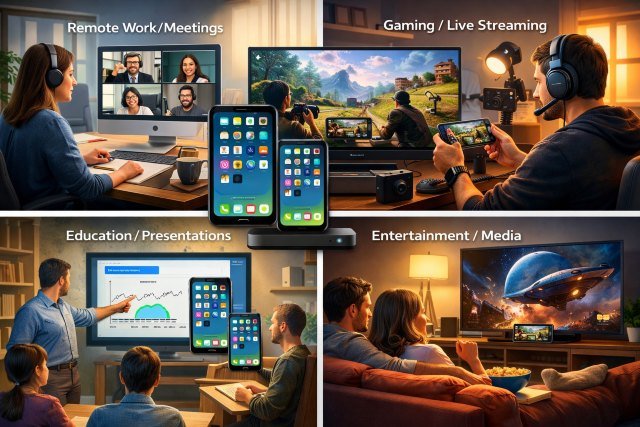
If you’ve searched Iosmirror lately, you’ve probably noticed something confusing: the name is used for more than one thing online. In some places, “Iosmirror” refers to screen mirroring (casting your phone screen to a TV/PC). In others, it’s marketed as a free streaming gateway that claims to provide premium movies/series without subscriptions — often tied to domains like iosmirror.cc and the term Iosmirror.cc apk.
- What is Iosmirror?
- Why Iosmirror is trending: the real demand behind the keyword
- Top Iosmirror use cases people are using it for right now
- Where Iosmirror.cc apk enters the picture — and why people search it
- Is Iosmirror safe? A realistic risk checklist (especially for APK installs)
- Better, safer alternatives depending on your goal
- Real-world examples: how people use Iosmirror-like tools
- FAQs about Iosmirror
- Conclusion: Should you use Iosmirror in 2026?
That split matters because the “use cases” people talk about depend on which Iosmirror experience they mean — and the safety and legality profile changes dramatically. This guide breaks down what people are using Iosmirror for right now, what actually works, where the risks are, and what safer alternatives look like.
What is Iosmirror?
In practical terms, Iosmirror is a brand label used across multiple sites and app listings, rather than a single clearly verified product with one official publisher identity. Some sources describe it as a mirroring/casting tool; others describe it as an entertainment/streaming hub associated with “free access” to content.
Quick definition:
Iosmirror is a name used by multiple services that claim to mirror screens across devices and/or provide streaming access through apps or websites — often distributed outside official app stores.
Because of the naming overlap, users often land on “APK” pages (Android install packages) branded as Iosmirror.cc apk even though “APK” is not an iOS format — another clue that much of the ecosystem is Android-focused or sideload-focused.
Why Iosmirror is trending: the real demand behind the keyword
People aren’t searching Iosmirror because they love brand names — they’re searching because they want outcomes:
- “Put my phone on the big screen.”
- “Show my iPhone screen on a Windows laptop for a tutorial.”
- “Share gameplay with friends.”
- “Watch something without juggling subscriptions.”
Some of these needs can be met cleanly with official tools like AirPlay for Apple devices. Apple documents AirPlay as a way to stream or mirror content from iPhone/iPad to Apple TV, AirPlay-compatible TVs, or a Mac.
Other needs (especially “free premium streaming”) often push users toward unofficial apps/sites — where the risks go up quickly.
Top Iosmirror use cases people are using it for right now
1) Screen mirroring for entertainment (movies, sports, TikTok, YouTube)
This is the most common and most “normal” reason people seek an Iosmirror-like solution: you’re holding a small screen, and you want it on a larger display.
Typical scenario:
You’re at home, guests arrive, and instead of passing a phone around, you cast your screen to a TV.
What works best in practice (safer path):
If you’re on iPhone/iPad and your display supports it, AirPlay is usually the simplest route. Apple’s support guidance covers streaming and full screen mirroring, and it tends to be more stable than random third-party mirroring apps.
Actionable tip: If mirroring stutters, your bottleneck is often Wi-Fi. Move closer to the router or shift both devices to the same 5GHz network (or a strong mesh node). Mirroring quality is mostly network quality.
2) Work presentations and teaching (live demos, slide walkthroughs, whiteboarding)
A lot of people searching “Iosmirror” are actually trying to solve a workplace/school pain point: presenting from a phone without awkward cable adapters.
Typical scenario:
A teacher wants to show a mobile app demo to a class. A marketer wants to walk a client through an Instagram profile or mobile landing page.
Why it’s useful:
When you mirror your phone, you can demonstrate real user flows: login screens, mobile navigation, camera-based features, QR scanning, and so on — things screenshots can’t replicate.
Safer path:
AirPlay to a Mac or AirPlay-compatible screen is well-supported in Apple’s ecosystem.
3) Creating content (tutorial recording, app walkthroughs, unboxing-style videos)
Another strong use case is content creation: YouTube tutorials, TikTok how-tos, and online course lessons.
Typical scenario:
You record your phone screen mirrored to a computer so you can capture it at a consistent resolution, edit it easily, and add voiceover.
What to look for in a mirroring tool (whether or not you use Iosmirror):
- Stable framerate (less “jitter”)
- Audio capture support if you need it
- Recording options (MP4 export, bitrate control)
If a tool forces you into installing a random APK from outside Google Play, treat that as a trust signal you should verify carefully.
4) Cross-device sharing: iPhone-to-Android (and Android-to-PC) viewing
Some Iosmirror-branded APK pages claim cross-platform compatibility (Android ↔ iOS, Android ↔ Mac/Windows, etc.).
This is a real need — especially in families or small teams where devices are mixed.
Practical note:
Even when cross-platform mirroring works, it can introduce more moving parts (web portals, device pairing codes, local network permissions). If you’re using this for work or classrooms, it’s worth choosing tools with clearer documentation and a track record.
5) Gaming on a bigger screen (casual play + party games)
People often use mirroring for mobile games because:
- You get a larger view.
- Friends can watch easily.
- Some like to route audio to speakers for a living-room feel.
Real-world gotcha:
Gaming highlights latency. If your mirroring setup adds noticeable delay, it’s still fine for turn-based or casual games, but frustrating for fast reaction games.
6) Remote troubleshooting (helping family members fix settings)
This is a surprisingly common “hidden” use case: mirroring for support.
Typical scenario:
Your parents call you about a confusing phone setting. If they can mirror to a TV/computer, you can guide them step-by-step without guessing what they see.
Where Iosmirror.cc apk enters the picture — and why people search it
The keyword Iosmirror.cc apk appears frequently alongside claims like:
- “Free access”
- “No subscription”
- “Premium content unlocked”
Some pages explicitly position iosmirror.cc as a gateway to movies and series without subscription fees.
This is also where risk increases — because “free premium streaming” is frequently tied to:
- copyright/legality concerns, and
- malware or phishing distribution patterns.
Even reputable security reporting consistently notes that mobile threats are real and evolving. For example, Kaspersky’s mobile threat reporting highlights large volumes of malicious or unwanted mobile installation packages discovered in a recent year.
And from the Android side, Google’s own materials emphasize that Play Protect scans apps to help protect devices, while Android enterprise guidance notes that apps from “unknown sources” (not installed from trusted stores) can increase risk to devices and data.
Is Iosmirror safe? A realistic risk checklist (especially for APK installs)
Safety depends on which Iosmirror you’re dealing with and how you install it. When something is distributed as an APK outside official stores, the burden shifts to you to verify authenticity.
Here’s a practical checklist:
Signs you should be cautious
- The site promises “premium content free” or “no subscription” with content associated with paid services.
- The download requires sideloading and pushes you to disable safeguards.
- The app asks for unrelated permissions (SMS, Accessibility, Device Admin) for a simple mirroring/streaming function.
What “good” looks like
- Clear publisher identity and consistent official domain/app-store presence
- Transparent privacy policy and data handling
- Reasonable permissions aligned with functionality
Android-specific safety baseline
- Keep Google Play Protect enabled (it scans apps and warns about harmful ones).
- Treat “unknown sources” installs as higher risk; Android enterprise guidance explicitly warns that such installs can increase risk to device/data.
Important: I can’t help with steps to obtain pirated content or bypass subscriptions. But I can help you evaluate safety signals and choose legitimate mirroring/streaming options.
Better, safer alternatives depending on your goal
If your goal is screen mirroring (not “free premium streaming”), you usually don’t need anything shady.
If you’re in the Apple ecosystem
AirPlay is the default first choice. It’s built into iOS/iPadOS and supported across Apple TV, many smart TVs, and Macs.
If you need iPhone → PC or mixed devices
Look for reputable vendors with clear documentation and long-standing reviews. (If you tell me your devices — iPhone model, Windows/Mac version, TV type — I can suggest the cleanest path.)
Real-world examples: how people use Iosmirror-like tools
Example 1: A trainer running a live mobile app workshop
A product trainer mirrors an iPhone to a projector so attendees can follow along. When someone gets stuck, the trainer switches screens and demonstrates the fix in real time.
What makes it successful: stable Wi-Fi + a known-good mirroring method (often AirPlay in Apple-heavy rooms).
Example 2: A small business filming a mobile checkout tutorial
A shop owner records a “how to order” guide by mirroring their phone to a laptop and screen-recording the laptop feed, then editing and adding captions.
What makes it successful: consistent resolution + clear taps + minimal latency.
Example 3: Families streaming personal media to the TV
Instead of passing around phones, they mirror photo albums and home videos to the living room screen.
What makes it successful: correct device pairing + same network.
FAQs about Iosmirror
What is Iosmirror used for?
Iosmirror is commonly used for screen mirroring, such as displaying a phone screen on a TV, computer, or another device for entertainment, presentations, tutorials, or gaming. In some places online, “Iosmirror” is also marketed as a streaming hub, which may involve higher legal and safety risks.
Is Iosmirror.cc apk an iPhone app?
An “APK” is an Android app package format, not an iPhone app format. When you see “Iosmirror.cc apk,” it generally indicates an Android distribution method or sideloading flow rather than a standard iOS App Store install.
Is sideloading APKs risky?
It can be. Google’s guidance highlights protections like Play Protect scanning, and Android enterprise documentation notes that apps installed from unknown sources can increase risk to devices and data.
What’s the safest way to mirror an iPhone screen?
For most people, the safest and simplest method is AirPlay, which Apple supports for streaming and screen mirroring to compatible devices.
Conclusion: Should you use Iosmirror in 2026?
If what you mean by Iosmirror is “I want to mirror my phone screen,” then the underlying use case is legitimate — and there are solid, safer ways to do it. For iPhone users especially, AirPlay is a reliable first option for streaming and screen mirroring to supported devices.
If what you mean by Iosmirror.cc apk is “I want free premium streaming,” be careful: that part of the ecosystem is where legal and security concerns tend to cluster, and installing apps from unknown sources can increase device and data risk.
If you tell me your exact setup (iPhone/Android model + where you want to mirror: TV, Windows PC, Mac, or projector), I’ll recommend the cleanest, lowest-friction method for your specific use case.