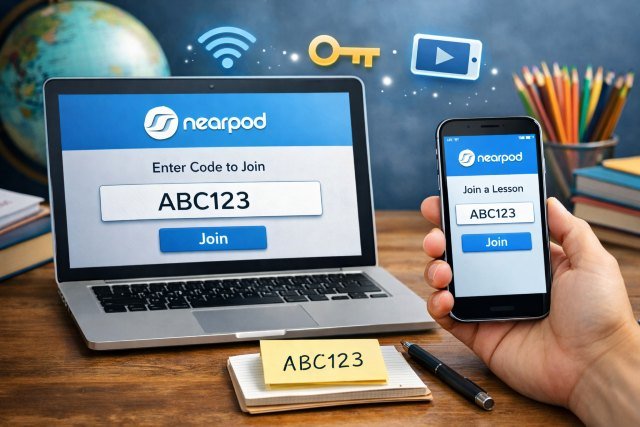
Nearpod Join is the fastest way to jump into an interactive class lesson — whether you’re in a physical classroom, on Zoom, or working from home. If your teacher shares a short code, you can enter it on Join.nearpod (also known as Join.nearpod / Join.nearpod.com) and immediately access the activity, quiz, video, or full lesson — often without creating an account. Nearpod is designed to work on almost any device with an internet connection, so joining is typically quick and painless.
- What is Nearpod Join?
- Join.nearpod vs. nearpod.com/student: which one should you use?
- Nearpod Join with a code (step-by-step)
- Join Nearpod through a link or LMS (Google Classroom, Teams, Canvas)
- Why Nearpod codes sometimes “don’t work”
- Nearpod Join tips that make class smoother
- What you can do after you Nearpod Join
- Evidence and research: does Nearpod actually help learning?
- Nearpod Join FAQs
- Troubleshooting checklist for Join.nearpod (quick fixes)
- Conclusion: Nearpod Join makes lesson access simple
You’ll learn exactly how Nearpod Join works, how to use a code correctly, what to do if the code fails, and how teachers can share the right type of session for live or self-paced learning.
What is Nearpod Join?
Nearpod Join is the student entry flow for Nearpod lessons. Teachers launch a lesson and share access using a code, a link, or an LMS integration (like Google Classroom, Teams, Canvas, etc.). Students then join through the web (commonly via Join.nearpod / join.nearpod.com / nearpod.com/student) or the Nearpod mobile app.
Nearpod’s approach is built for flexibility: it can run in live teacher-led mode or student-paced mode, and it’s web-based across devices.
Join.nearpod vs. nearpod.com/student: which one should you use?
Both routes are meant to get you into the same place: your teacher’s lesson.
- Join.nearpod (join.nearpod.com): A direct “join” portal experience that many teachers reference as “Join Nearpod.”
- nearpod.com/student: The student join page referenced in Nearpod’s help documentation for joining with a code.
If your teacher specifically says “Go to Join.nearpod,” use that. If they say “go to Nearpod Student,” nearpod.com/student is the official student join page mentioned in support instructions.
Nearpod Join with a code (step-by-step)
How to join Nearpod as a student using a code
Nearpod uses a five-character code for students to enter and join the lesson.
Here’s the typical flow:
- Open your browser and go to Join.nearpod (join.nearpod.com) or nearpod.com/student.
- Enter the five-character code your teacher provided.
- After you enter the code, you may be asked to confirm your name (student name validation) or you may see an option like Join as a Guest — this depends on the settings your teacher enabled.
- Start participating (answer polls, complete quizzes, draw, collaborate, etc.) as the lesson progresses.
Example scenario:
Your teacher projects a slide that says: “Nearpod Join code: X7P9Q.” You open Join.nearpod on your phone, type X7P9Q, enter your name, and you’re in — ready for the first poll.
Join Nearpod through a link or LMS (Google Classroom, Teams, Canvas)
Sometimes you won’t get a code at all. Teachers can also share Nearpod access by sending a link or posting it inside an LMS. In that case, you usually just click the link and it opens the lesson directly in your browser.
When this is common:
- Homework or asynchronous assignments (student-paced)
- Remote classes where the teacher posts one link to rule them all
- Schools that require single sign-on (SSO) through LMS tools
Why Nearpod codes sometimes “don’t work”
If Nearpod Join is failing, it’s usually not random — there’s almost always a clear cause. Here are the most common ones, plus what to do.
The code expired (or the teacher ended the session)
Nearpod join codes are typically tied to a session the teacher launched. If they ended it, or if you’re using yesterday’s code, it may be invalid.
Fix: Ask your teacher to relaunch the lesson or share the updated code/link.
You typed a character wrong
Five characters sounds simple, but mix-ups happen: O vs 0, I vs 1, S vs 5.
Fix: Re-enter the code slowly. If possible, copy/paste a link instead.
You’re joining the wrong mode (Live vs Student-Paced)
Teachers can launch Nearpod in multiple delivery modes, including Live Participation and Student-Paced. The join experience and timing can differ, especially if you’re trying to join live after the class already moved forward.
Fix: Confirm whether your teacher wants you in Live Participation (teacher-led) or Student-Paced (self-paced).
Student name validation is required
Nearpod may require name validation or restrict guest entry depending on teacher settings.
Fix: Use the name format your teacher expects, or sign in if your school requires it.
Network or device restrictions
School networks sometimes block tools, or your browser may have strict privacy settings.
Fix:
- Try switching from school Wi-Fi to a hotspot (if allowed)
- Try another browser (Chrome/Edge/Safari)
- Update the Nearpod app if you’re using mobile
Nearpod Join tips that make class smoother
For students
Keep Join.nearpod in a bookmark.
If you join Nearpod often, bookmarking Join.nearpod or nearpod.com/student reduces friction.
Use the same name every time.
If your teacher is tracking participation, consistent naming helps avoid duplicate entries — especially when name validation is enabled.
Join early when it’s a live session.
In Live Participation, teachers control pacing, and joining late can feel confusing because the class may already be on a different slide.
For teachers
Choose the right mode for the objective.
Nearpod explicitly supports multiple delivery modes; selecting Live vs Student-Paced impacts the learner experience and classroom management.
Create separate join codes for different groups (when needed).
Nearpod’s launch workflow can support different groups having their own join paths from the same Nearpod lesson — useful for differentiation or multiple class periods.
What you can do after you Nearpod Join
Nearpod isn’t just “watch a slideshow.” It’s designed for interactive delivery: teachers can mix multimedia, quizzes, polls, and collaboration, and view real-time formative assessment data to guide instruction.
A key reason Nearpod is widely adopted is its ready-to-use content library. For example, an ISTE Seal review report describes Nearpod as providing a library of 22,000 standards-aligned lessons, videos, and activities (alongside teacher-created content and analytics).
Evidence and research: does Nearpod actually help learning?
If you’re writing about edtech (or deciding whether to roll it out), it helps to point to third-party research rather than hype.
ESSA-aligned evidence reports (LearnPlatform by Instructure)
Nearpod commissioned LearnPlatform (a third-party edtech research group) for ESSA-aligned studies.
- An ESSA Evidence Level II report (focused on 2022–23 usage and outcomes in a California district) describes a sample including students across 25 schools, and reports usage patterns like average active weeks and session launches.
- A separate ESSA Evidence Level III report (2021–22, Texas district) includes outcome analyses covering 28,968 students and 1,029 teachers, and reports a pattern of positive associations between more consistent Nearpod usage and higher end-of-year assessment scores (STAAR), especially in grades 3–8.
Important note (for credibility): These reports are correlational/implementation-oriented (especially Level III), so they suggest associations rather than proving causation — but they’re still useful, transparent evidence sources for adoption decisions.
Nearpod Join FAQs
What is the Nearpod Join code?
A Nearpod Join code is typically a five-character code shared by the teacher that students enter on Join.nearpod (or nearpod.com/student) to access a specific lesson session.
Do I need an account to Join Nearpod?
Not always. Many sessions allow students to enter a name or join as a guest, though some classes require sign-in depending on school settings and teacher preferences.
Can I join Nearpod on my phone?
Yes — students can join through a mobile browser or the Nearpod iOS/Android app, and Nearpod is described as web-based and usable on any device with an internet connection.
Why does my Nearpod code say invalid?
Usually because the session ended, the code expired, or the code was entered incorrectly. Ask your teacher to confirm the current code or send a link. (Nearpod also supports joining through web links and LMS posts.)
What’s the difference between Live and Student-Paced?
Live Participation is teacher-led (the teacher controls pacing). Student-Paced lets students move through the lesson independently from anywhere, anytime.
Troubleshooting checklist for Join.nearpod (quick fixes)
If you want the fastest route to success, run through this quick set of checks:
- Confirm the five-character code with your teacher.
- Make sure you’re using Join.nearpod / join.nearpod.com or nearpod.com/student.
- Try a different browser if the page loads but won’t join.
- If you’re blocked at the name screen, ask whether name validation or sign-in is required.
- If you’re joining from an LMS, click the original assignment link again (don’t rely on a screenshot of an old code).
Conclusion: Nearpod Join makes lesson access simple
Nearpod Join is meant to remove friction: get a five-character code, open Join.nearpod (or nearpod.com/student), enter the code, and you’re learning — on almost any device. If a code fails, it’s usually because the session ended, the mode doesn’t match (Live vs Student-Paced), or your class settings require name validation or sign-in.
For teachers and schools, Nearpod’s value isn’t only convenience — it’s interactive delivery backed by analytics and a large standards-aligned content library, plus third-party ESSA-aligned research reports that explore how usage relates to student outcomes.