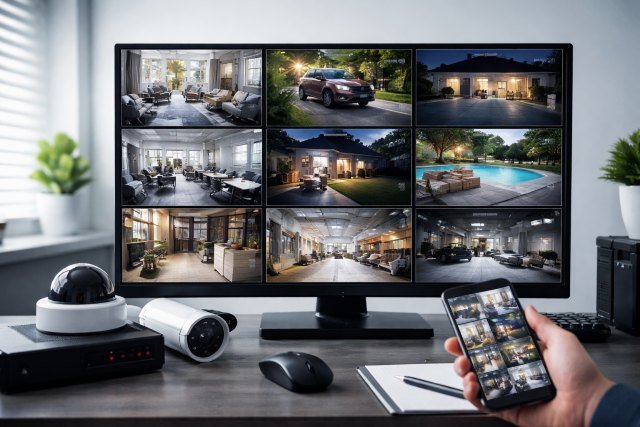
A security camera screen is the central point where surveillance becomes meaningful. Cameras capture footage, but the screen is where users interpret activity, identify threats, and make fast decisions. Whether it’s a homeowner checking a live feed on a phone or a security team monitoring dozens of cameras on a wall-mounted display, the quality and functionality of the screen directly affect safety outcomes.
- What Is a Security Camera Screen?
- Why a Security Camera Screen Is Critical for Monitoring and Safety
- Types of Security Camera Screens
- Key Features to Look for in a Security Camera Screen
- How a Security Camera Screen Works with DVRs and NVRs
- Real-World Scenarios Where a Security Camera Screen Makes the Difference
- Best Practices for Setting Up Your Security Camera Screen
- Security Camera Screen for Home vs Business Use
- Common Questions About Security Camera Screens
- Future Trends in Security Camera Screens
- Conclusion: Why the Security Camera Screen Is the Heart of Surveillance
In the first few seconds of viewing a live feed, clarity, responsiveness, and layout matter. According to a report by IHS Markit, over 1 billion surveillance cameras are in use globally, and that number continues to rise as monitoring technology becomes more accessible. As adoption grows, the importance of a reliable and well-optimized security camera screen becomes impossible to ignore.
This guide explains what a security camera screen is, how it works, the types available, and how to choose the right one for your needs. It also answers common questions and provides expert-backed insights to help you maximize monitoring and safety.
What Is a Security Camera Screen?
A security camera screen is the display interface used to view live or recorded footage from one or multiple surveillance cameras. It can be a dedicated monitor connected to a DVR or NVR, a computer screen running monitoring software, or a mobile device using a camera app.
Unlike standard displays, security camera screens are designed for continuous viewing, multi-camera layouts, and real-time alerts. They often support split-screen views, motion detection overlays, and instant playback controls. This makes them essential for both residential and commercial security systems.
From a safety perspective, the screen acts as the user’s eyes. A well-configured screen reduces reaction time, improves situational awareness, and minimizes the chance of missing critical events.
Why a Security Camera Screen Is Critical for Monitoring and Safety
Monitoring without a clear screen is like driving with a foggy windshield. Even the most advanced camera system loses value if the display fails to present information clearly and quickly.
A high-quality security camera screen improves threat detection by providing sharp resolution and smooth frame rates. This is especially important in identifying faces, license plates, or suspicious behavior. Research from the UK Home Office shows that effective video monitoring can reduce crime by up to 16% in well-monitored areas, particularly when operators can clearly see and respond to incidents.
Safety also improves through proactive monitoring. For example, a business owner watching a multi-camera screen can spot unsafe employee behavior, while parents can monitor entrances and outdoor areas in real time. The screen becomes a tool not just for security, but for prevention.
Types of Security Camera Screens
Dedicated Surveillance Monitors
Dedicated surveillance monitors are built specifically for continuous camera viewing. They differ from consumer TVs by offering longer uptime, anti-burn-in technology, and optimized refresh rates for video feeds. These monitors are common in control rooms, retail stores, and large offices.
A dedicated security camera screen often supports 24/7 operation and displays multiple camera feeds without degrading image quality. This makes it ideal for professional monitoring environments.
Computer-Based Monitoring Screens
Many modern systems use a PC or laptop as the primary security camera screen. Software-based platforms allow users to customize layouts, zoom into feeds, and analyze recorded footage. This option is popular with small businesses and tech-savvy homeowners.
Computer screens offer flexibility, but they depend heavily on system performance. A slow processor or outdated graphics card can cause lag, which reduces monitoring effectiveness.
Mobile and Tablet Screens
Mobile devices have transformed how people interact with security systems. A smartphone or tablet can act as a portable security camera screen, providing live feeds, alerts, and playback from anywhere.
According to Statista, over 60% of smart security system users rely primarily on mobile apps for monitoring. While mobile screens are smaller, their convenience and real-time notifications significantly enhance personal safety.
Key Features to Look for in a Security Camera Screen
Resolution and Image Clarity
Resolution is one of the most important aspects of any security camera screen. Full HD (1080p) is the minimum standard for clear monitoring, while 4K displays are increasingly common in professional setups. Higher resolution ensures that details remain visible even when viewing multiple cameras at once.
Clarity directly affects decision-making. Blurry footage can delay response times and reduce the usefulness of recorded evidence.
Multi-Camera Display Support
A strong security camera screen should handle multiple feeds simultaneously. Split-screen and grid views allow users to monitor entrances, exits, and key areas at the same time.
For example, a retail store may use a single screen to display cameras covering the cash register, aisles, and back entrance. This centralized view improves situational awareness and reduces blind spots.
Low Latency and Smooth Playback
Latency refers to the delay between real-world action and what appears on the screen. In security scenarios, even a one-second delay can matter. A quality screen paired with a capable system ensures near real-time viewing.
Smooth playback is equally important during investigations. Scrubbing through footage should feel responsive, allowing users to quickly locate incidents.
How a Security Camera Screen Works with DVRs and NVRs
A security camera screen does not work alone. It relies on recording systems like DVRs (Digital Video Recorders) and NVRs (Network Video Recorders). DVRs are typically used with analog cameras, while NVRs support IP-based cameras.
The recorder processes video data and sends it to the screen in a structured format. Modern systems allow users to customize layouts, adjust brightness, and apply digital zoom directly from the screen interface.
Understanding this connection helps users troubleshoot issues like blank screens or lagging feeds. For a deeper technical explanation, you can refer to resources from Axis Communications, a global leader in network video solutions.
Real-World Scenarios Where a Security Camera Screen Makes the Difference
Consider a small warehouse operating overnight. Without a live security camera screen, staff would only review footage after an incident. With a properly configured screen, security personnel can identify unauthorized access in real time and alert authorities immediately.
In residential settings, parents often use a security camera screen to monitor driveways or backyards. A clear night-vision display can reveal suspicious movement before it becomes a serious threat.
These scenarios highlight how the screen transforms passive recording into active protection.
Best Practices for Setting Up Your Security Camera Screen
Placement plays a critical role in screen effectiveness. The screen should be positioned at eye level, in a low-glare environment, and visible from the main monitoring area. Poor placement can cause eye strain and missed details.
Brightness and contrast settings should be adjusted based on lighting conditions. A screen that is too dim hides details, while one that is too bright can wash out important features.
Regular testing ensures that feeds display correctly and alerts appear when triggered. Many security experts recommend a weekly system check to confirm that the security camera screen and cameras are functioning properly.
Security Camera Screen for Home vs Business Use
Home users typically prioritize ease of use and mobile access. A tablet or smart display often serves as the primary security camera screen, allowing quick checks throughout the day.
Businesses, on the other hand, require larger displays and multi-screen setups. A single security desk may use several monitors to display dozens of camera feeds simultaneously. These environments benefit from dedicated surveillance monitors designed for constant use.
Understanding these differences helps users avoid overspending or under-equipping their system.
Common Questions About Security Camera Screens
What size screen is best for security camera monitoring?
The ideal size depends on the number of cameras. For four to eight cameras, a 24 to 27-inch screen works well. Larger systems often use 32-inch or bigger displays to maintain clarity.
Can I use a TV as a security camera screen?
Yes, many systems support TVs via HDMI. However, TVs are not designed for 24/7 operation and may suffer from burn-in over time. Dedicated surveillance monitors are more reliable for continuous monitoring.
Does screen quality affect video evidence?
Absolutely. While footage is recorded at the camera’s resolution, reviewing it on a low-quality screen can obscure details. A high-resolution security camera screen ensures accurate analysis during investigations.
Future Trends in Security Camera Screens
As artificial intelligence becomes more integrated into surveillance, security camera screens are evolving. Modern interfaces now include AI-driven alerts, facial recognition indicators, and heat maps that highlight unusual activity.
Touchscreen controls and voice integration are also becoming more common, making interaction faster and more intuitive. These advancements further strengthen the role of the screen as an active safety tool rather than a passive display.
Conclusion: Why the Security Camera Screen Is the Heart of Surveillance
A security camera screen is more than just a display. It is the control center where monitoring, analysis, and safety decisions come together. From improving real-time awareness to enhancing evidence review, the right screen amplifies the effectiveness of any security system.
By choosing a high-quality screen, optimizing its setup, and understanding how it integrates with your cameras, you significantly improve both monitoring efficiency and overall safety. Whether for a home, office, or large facility, investing in the right security camera screen is a practical and powerful step toward smarter protection.