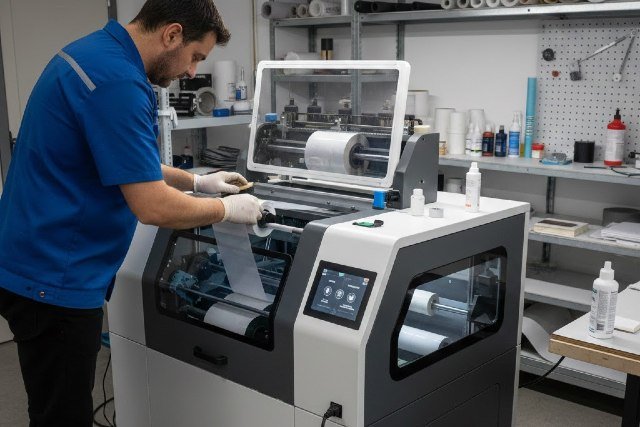
Direct-to-Film printing has rapidly become one of the most profitable and flexible methods in the custom apparel industry. A DTF printer allows businesses to print vibrant, durable designs on a wide range of fabrics with minimal setup compared to traditional screen printing. However, achieving consistent, professional results depends heavily on proper setup, regular maintenance, and proven best practices.
- What Is a DTF Printer and How Does It Work?
- DTF Printer Setup: Step-by-Step for Beginners
- DTF Printer Maintenance: Keeping Your Machine Running Smoothly
- Best Practices for High-Quality DTF Printing
- Real-World Example: Small Business DTF Success Story
- DTF Printer vs DTG and Screen Printing
- Frequently Asked Questions About DTF Printers
- Conclusion: Mastering Your DTF Printer for Long-Term Success
In this in-depth guide, you will learn everything you need to know about a DTF printer, from initial setup to long-term care. Whether you are a beginner launching a print-on-demand business or an experienced professional looking to improve output quality, this article will help you maximize performance and return on investment.
What Is a DTF Printer and How Does It Work?
A DTF printer is a specialized inkjet printer that prints designs onto a PET film using water-based pigment inks. After printing, a layer of hot-melt adhesive powder is applied to the wet ink. The film is then cured with heat and transferred onto fabric using a heat press.
Unlike DTG printing, a DTF printer does not require pretreatment of garments. This makes it compatible with cotton, polyester, blends, nylon, and even leather. According to FESPA, DTF adoption has grown significantly due to its versatility and lower production barriers compared to traditional garment printing methods.
The core components of a DTF printing system include the printer itself, DTF inks, PET transfer film, adhesive powder, curing equipment, and a heat press. Each component plays a critical role in print durability and color accuracy.
DTF Printer Setup: Step-by-Step for Beginners
Proper DTF printer setup is essential for avoiding common issues such as banding, ink clogging, and poor adhesion. Taking the time to configure your equipment correctly will save money and reduce downtime.
Choosing the Right Location for Your DTF Printer
Your DTF printer should be placed in a clean, temperature-controlled environment. Ideal operating conditions range between 20°C and 28°C with humidity levels between 45% and 65%. Epson, a leading inkjet technology manufacturer, notes that improper humidity is a primary cause of nozzle clogging in pigment-based printers.
Avoid dusty areas, direct sunlight, and spaces with high airflow. Dust particles can settle on the PET film and affect ink adhesion during printing.
Installing DTF Ink and PET Film Correctly
When installing DTF ink, gently shake each ink bottle before filling the tanks to ensure pigment consistency. Always use inks specifically formulated for DTF printers, as standard dye inks will not bond properly with adhesive powder.
Load the PET film with the coated side facing up. Many beginners make the mistake of printing on the wrong side of the film, which results in failed transfers. A simple water droplet test can help identify the coated side, as water will bead instead of spreading.
RIP Software Configuration for DTF Printing
RIP software controls color management, white ink density, and print resolution. Popular RIP solutions such as Acrorip and EKPrint are commonly used with DTF printers.
Set your print resolution between 1440 and 2880 DPI for optimal balance between quality and speed. White ink layers should be dense enough to provide opacity but not so thick that they crack after pressing.
DTF Printer Maintenance: Keeping Your Machine Running Smoothly
Consistent maintenance is critical to extending the life of a DTF printer and ensuring print quality remains high over time. Neglecting maintenance is one of the most common reasons printers fail prematurely.
Daily DTF Printer Maintenance Routine
Daily nozzle checks should be performed before starting production. This ensures that all ink channels are flowing correctly, especially white ink, which is more prone to settling and clogging.
Gently agitate the white ink tank if your printer does not have an automatic circulation system. This prevents pigment separation and uneven prints.
Wipe the printhead area and capping station with lint-free wipes and approved cleaning solution. Never use alcohol unless recommended by the manufacturer.
Weekly and Monthly Maintenance Tasks
On a weekly basis, clean the wiper blade and flushing box to prevent ink buildup. Ink residue in these areas can cause streaking and overspray.
Monthly maintenance should include a deeper inspection of ink lines, dampers, and filters. Replacing worn components early is more cost-effective than repairing a damaged printhead.
According to industry service data from Roland DG, printers that follow scheduled maintenance experience up to 30% fewer mechanical failures over a two-year period.
Best Practices for High-Quality DTF Printing
Following best practices ensures that your DTF printer produces consistent, vibrant, and long-lasting transfers that meet customer expectations.
Optimizing Heat Press Settings
Correct heat press settings are just as important as printer calibration. Most DTF transfers require temperatures between 150°C and 165°C with medium pressure and a press time of 10 to 15 seconds.
After pressing, allow the film to cool before peeling if you are using cold-peel film. Hot-peel films should be removed immediately. Always follow the film manufacturer’s recommendations to avoid lifting or cracking.
Preventing Common DTF Printing Problems
Poor adhesion is often caused by insufficient adhesive powder coverage or uneven curing. Ensure the powder is evenly distributed and fully melted before pressing.
Cracking designs usually indicate excessive white ink or too much pressure during heat pressing. Reducing white ink density by 5–10% often resolves this issue.
Color inconsistency can be addressed through proper ICC profiles and regular printer calibration. Consistent lighting conditions during design work also help maintain color accuracy.
Real-World Example: Small Business DTF Success Story
A small apparel startup in Texas transitioned from vinyl cutting to DTF printing in 2023. By investing in a mid-range DTF printer and following strict maintenance routines, the business reduced production time by 40% and expanded its product line to include polyester sportswear and tote bags.
Within six months, customer complaints related to print durability dropped significantly. The owner attributed this success to consistent printer upkeep and proper curing techniques rather than upgrading equipment.
DTF Printer vs DTG and Screen Printing
Compared to DTG, a DTF printer offers better fabric versatility and lower pretreatment costs. Screen printing remains cost-effective for large runs but lacks the flexibility and fast turnaround of DTF.
For small to medium businesses, DTF printing provides an ideal balance between quality, scalability, and upfront investment.
Frequently Asked Questions About DTF Printers
How long does a DTF printer last?
With proper maintenance, a DTF printer can last three to five years or longer. Printhead lifespan depends heavily on ink quality and cleaning routines.
Is a DTF printer profitable for beginners?
Yes, a DTF printer is considered beginner-friendly due to low setup costs and broad application potential. Many startups break even within a few months when combined with effective marketing.
What fabrics work best with DTF printing?
DTF printing works well on cotton, polyester, blends, nylon, and dark or light fabrics. This versatility is one of the main reasons for its popularity.
Conclusion: Mastering Your DTF Printer for Long-Term Success
A DTF printer is a powerful tool for modern apparel decoration, but its performance depends on correct setup, consistent maintenance, and proven best practices. By controlling your environment, maintaining your equipment, and refining your heat press workflow, you can produce professional-grade prints that stand the test of time.
As the demand for custom printing continues to grow, businesses that invest in proper DTF printer care and education will maintain a competitive edge. With the right approach, your DTF printer can become a reliable, profitable cornerstone of your printing operation.