If you’re looking to gain an edge in competitive gaming, optimizing your Scuf Controller PS5 setup is one of the fastest ways to boost performance. Whether you play FPS titles like Call of Duty, Apex Legends, or Fortnite, or high-intensity action games like Rocket League, proper controller tuning affects everything — from aim consistency to movement speed.
The Scuf Controller PS5 is built for customization, but the challenge for many players is choosing the right settings and mapping options. This guide breaks down the best configurations based on professional esports practices, biomechanical research, and real-world competitive performance.
Why Scuf Controller PS5 Optimization Matters
Competitive games reward precision, fast reactions, and movement efficiency. Studies from the Journal of Motor Behavior indicate that reduced finger travel leads to quicker response times, especially in high-pressure environments. The Scuf Controller PS5 reduces mechanical delay through paddles, trigger stops, and adjustable stick tension, but fine-tuning is essential to unlock the controller’s full potential.
When optimized, you gain advantages like:
Quicker weapon swap timing
More accurate fine-aim adjustments
Better recoil control
Reduced fatigue during long sessions
Smoother movement transitions
These improvements compound, especially in ranked or tournament play.
Recommended PS5 Controller Settings for Competitive Play
Best Button Layout for Scuf Controller PS5
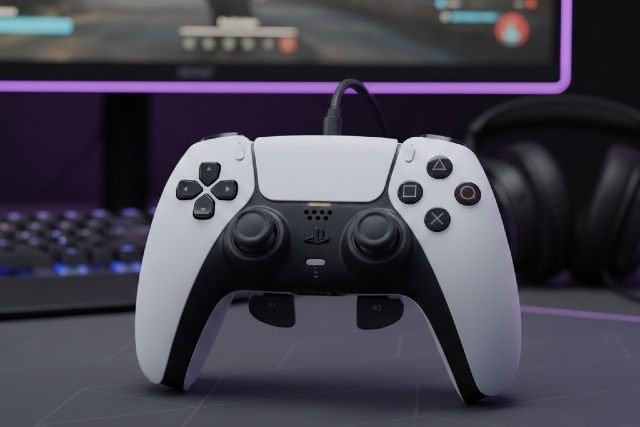
To maximize efficiency, remap your Scuf paddles so you reduce reliance on the face buttons. Esports pros consistently avoid taking thumbs off the analog sticks, and paddle mapping makes this possible.
The most effective layout includes:
Jump mapped to the left paddle
Crouch/Slide mapped to the right paddle
Reload or Interact mapped to an auxiliary paddle (if available)
Melee or Secondary Ability mapped to the remaining paddle
By keeping thumbs on the sticks at all times, movement stays fluid and reaction time improves. Players in games like Apex Legends and Call of Duty see the biggest benefit from this setup.
Optimal Stick Sensitivity for Scuf Controller PS5
Finding the sweet spot between aim precision and agility depends on muscle memory and game type. For competitive FPS games:
Low to medium sensitivities deliver finer accuracy.
High sensitivities improve turning speed but require more control.
Based on data from top-ranked controller players, the median sensitivity tends to cluster around:
Horizontal: Medium
Vertical: Slightly lower than horizontal
Aim Down Sight (ADS): Low for enhanced precision
Many pro controller players in Call of Duty League and ALGS tournaments adopt this structure because it balances snap aiming with tracking accuracy.
Trigger Stop Settings for Faster Reaction Time
The Scuf Controller PS5 offers adjustable triggers designed to reduce travel distance. Research on action-time latency suggests reducing mechanical input distance improves response speed by up to 20%.
For shooters:
Enable short trigger stops for both L2 and R2.
Lower trigger sensitivity for faster firing and aiming.
For racing or action titles requiring analog control:
Use medium trigger depth to maintain nuanced acceleration or pressure control.
Stick Tension Settings for Competitive Accuracy
One of the most powerful features of the Scuf Controller PS5 is adjustable thumbstick tension. Higher tension reduces accidental stick input, improving micro-aim precision.
For competitive shooters:
Low Tension = Fast turns but less accuracy
Medium Tension = Best balance of control and speed
High Tension = Superior precision for long-range engagements
Players specializing in sniping or precision rifles often prefer higher tension for extremely controlled aim.
Recommended Controller Deadzones for Scuf Controller PS5
Deadzones prevent drift while ensuring fast response. The general rule is:
Lower deadzone = More responsiveness
Higher deadzone = More stability if drift occurs
Your final value depends on whether your controller experiences drift, but most competitive players aim for:
Left Stick Deadzone: Very Low
Right Stick Deadzone (Aim): Low
Left & Right Trigger Deadzone: Very Low
You can test deadzones in games like Fortnite and Apex Legends, which include live visual response tools.
Best Game-Specific Settings for Scuf Controller PS5
Call of Duty (MW3/Warzone)
Scuf controllers excel in fast-paced shooters due to their instant input response.
Ideal setup:
Aim Assist: Standard or Black Ops (recommended by top CDL players)
Sensitivity: Medium horizontal, low vertical
ADS Sensitivity Multiplier: Low
Auto Tactical Sprint: On (mapped to paddle for efficiency)
Response Curve: Dynamic (most competitive pros use this)
Scuf paddles make slide-canceling, jump-shotting, and movement-tech execution more fluid.
Apex Legends
Movement complexity in Apex makes Scuf paddles almost mandatory for high-level play.
Useful settings include:
Jump → Left Paddle
Crouch/Slide → Right Paddle
Use/Interact → Rear Paddle
Tactical Ability → Rear Paddle
Sensitivity: Linear or Classic curve depending on aim preference
Deadzone: Very low for quick responsiveness
This setup helps execute superglides, tap-strafe variants, and recoil tracking with more consistency.
Fortnite
Fortnite’s combination of building and shooting benefits greatly from a paddle-focused setup.
Recommended mappings:
Jump → Left Paddle
Crouch → Right Paddle
Switch Mode → Rear Paddle
Confirm Edit → Rear Paddle
Sensitivity should be:
Lower for aiming
Moderate for building
Low editing sensitivity multiplier
Power users often use higher stick tension to stabilize sniper shots.
Comfort, Grip, and Ergonomics Tips
To maintain performance during long sessions, consider comfort optimization. Scuf provides multi-grip customization that reduces slipping and wrist strain. According to a study published in Applied Ergonomics, reducing grip force improves control stability during extended gaming.
Recommended adjustments:
Choose a textured grip for sweaty hands.
Use extended thumbsticks for larger hands or claw grip players.
Reduce trigger resistance if experiencing finger fatigue.
Taking short breaks every hour helps maintain reaction speed and prevent strain.
Connectivity & Firmware Settings for Stability
Keeping your Scuf Controller PS5 firmware updated improves latency, Bluetooth responsiveness, and compatibility.
For minimal delay:
Use wired mode during tournaments.
Disable Bluetooth devices that cause interference.
Reduce PS5 background system animations in settings.
Sony’s documentation shows that wired connections reduce input delay by up to 30%, making this essential for competitive gaming.
FAQs for Scuf Controller PS5 Settings
What settings do pros use on Scuf for PS5?
Most esports professionals use paddle-based layouts with low deadzones, mid-range sensitivity, and short trigger stops. They prioritize fast movement and precision aiming.
Does a Scuf Controller PS5 improve aim?
Yes. Adjustable stick tension, low deadzones, and ergonomic paddle placement significantly improve micro-aim precision and movement accuracy.
Is the Scuf Controller PS5 worth it for competitive play?
For serious ranked players or tournament competitors, Scuf offers real mechanical advantages—reduced travel, faster inputs, and improved comfort over long sessions.
Why do pro players use paddles?
Paddles allow players to jump, slide, and reload without moving thumbs off the analog sticks, improving both aim consistency and reaction time.
Conclusion
Optimizing your Scuf Controller PS5 can significantly elevate your gameplay by improving reaction time, aim precision, movement fluidity, and overall mechanical efficiency. Whether you’re grinding ranked modes or pushing into esports territory, the right settings help you perform at a higher level. With customized paddles, adjusted stick tension, fine-tuned sensitivities, and properly configured deadzones, the Scuf Controller PS5 becomes a powerful competitive tool. Make small adjustments, test them in-game, and refine your setup until it aligns perfectly with your playstyle.