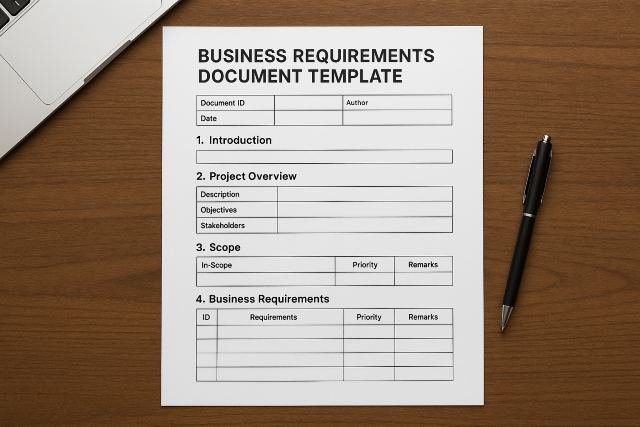
A Business Requirements Document Template (BRD template) is one of the most important tools in project management, helping teams clearly define business goals, project scope, functional and non-functional requirements, stakeholders, timelines, and success criteria. Whether you’re planning a software development project, launching a new business process, or implementing enterprise systems, a BRD ensures alignment, reduces misunderstandings, and keeps projects on track.
- 1. Project Overview
- 2. Business Objectives
- 3. Project Scope
- 4. Stakeholder List
- 5. Business Requirements
- 6. Functional Requirements
- 7. Non-Functional Requirements (NFRs)
- 8. Assumptions & Constraints
- 9. Current vs. Future State Analysis
- 10. Workflow Diagrams
- 11. Data Requirements
- 12. Acceptance Criteria
- 13. Success Metrics
- 14. Risks & Mitigation Strategies
- 15. Implementation Timeline
- 16. Approval & Sign-Off
- Example 1: Software Onboarding System
- Example 2: E-Commerce Checkout Upgrade
- 1. Involve the Right Stakeholders Early
- 2. Keep Requirements Clear and Testable
- 3. Avoid Technical Jargon
- 4. Align BRD with Company Strategy
- 5. Validate Requirements Through Workshops
- 6. Use Version Control
This comprehensive guide covers the key sections, structure, examples, and best practices for creating an effective Business Requirements Document Template.
What Is a Business Requirements Document (BRD)?
A Business Requirements Document (BRD) outlines the business needs, objectives, processes, and expectations for a new project or solution. It serves as a shared reference between:
- Business stakeholders
- Project managers
- Analysts
- Developers
- QA teams
- Vendors
The BRD describes what the business needs — not how the solution should be implemented.
Why You Need a Business Requirements Document Template
Using a Business Requirements Document Template helps organizations:
- Standardize documentation
- Improve communication
- Reduce project risks
- Prevent scope creep
- Align business and technical teams
- Speed up requirement gathering
Templates ensure consistency across departments and projects, especially in medium and large organizations.
Key Sections of a Business Requirements Document Template
Below is a detailed look at the essential BRD sections, along with examples.
1. Project Overview
This section introduces the project at a high level.
What to Include:
- Project name
- Brief description
- Business driver
- Background/problem statement
Example:
The current customer onboarding process is manual and error-prone. This project aims to automate onboarding through a centralized software platform.
2. Business Objectives
This section clearly states what the project aims to achieve.
Examples of Business Objectives:
- Reduce onboarding time by 50%
- Increase customer satisfaction score by 20%
- Decrease manual data entry errors
- Improve compliance reporting
3. Project Scope
Define what is included — and what is not.
Scope Includes:
- Development of onboarding portal
- Integration with CRM
- User authentication
Out of Scope:
- Backend infrastructure upgrades
- Non-customer onboarding workflows
Scope clarity helps prevent scope creep.
4. Stakeholder List
List all people involved in or affected by the project.
Stakeholders Include:
| Role | Name/Department | Responsibility |
|---|---|---|
| Project Sponsor | CEO | Final approval |
| Product Owner | PM Team | Requirement clarification |
| Developers | Tech Team | Implementation |
| Compliance Officer | Legal | Regulatory requirements |
5. Business Requirements
This is the heart of the Business Requirements Document Template.
Business requirements describe what the solution must do to satisfy business needs.
Examples of Business Requirements:
- The system shall allow customers to upload documents securely.
- The system shall send automated onboarding confirmation emails.
- The workflow shall automatically assign tasks to internal teams.
- The system must validate all mandatory fields before submission.
Use numbered lists to make requirements traceable.
6. Functional Requirements
Functional requirements describe the specific behaviors and features of the system.
Examples:
| Requirement ID | Description |
|---|---|
| FR-001 | The user must log in using email + password. |
| FR-002 | The system should display the onboarding dashboard. |
| FR-003 | The system must integrate with the CRM via API. |
7. Non-Functional Requirements (NFRs)
NFRs define performance, reliability, scalability, and usability expectations.
Examples:
- System must load within 2 seconds.
- Uptime must be 99.9%.
- Solution must support 50,000+ users.
- Must comply with GDPR and HIPAA standards.
8. Assumptions & Constraints
This section protects the team from unexpected limitations.
Assumptions Example:
- End users will have internet access.
Constraints Example:
- Must be completed by end of Q3.
9. Current vs. Future State Analysis
This section identifies gaps between the existing and proposed systems.
Example Table:
| Current State | Future State |
|---|---|
| Manual data entry | Automated data entry |
| Email-based onboarding | Web portal onboarding |
| Static documents | Dynamic document uploads |
10. Workflow Diagrams
Diagrams offer visual clarity.
Common diagrams include:
- BPMN workflows
- Flowcharts
- Swimlane diagrams
- Use-case diagrams
Visuals simplify complex processes.
11. Data Requirements
Define how data will be:
- Stored
- Processed
- Transferred
- Validated
Example:
All customer data must be encrypted in transit (TLS 1.3) and at rest (AES-256).
12. Acceptance Criteria
Clear acceptance criteria help QA teams verify successful implementation.
Example Criteria:
- Users can register successfully.
- Emails trigger correctly within 2 minutes.
- All uploaded documents appear in admin dashboard.
13. Success Metrics
Define KPIs to measure project success.
Examples:
- Reduce onboarding time to 10 minutes
- 95% form completion rate
- 98% uptime during first 90 days
14. Risks & Mitigation Strategies
Identify potential risks and solutions.
Example Table:
| Risk | Impact | Mitigation |
|---|---|---|
| Delay in API integration | High | Start integration early |
| Data security breach | Critical | Enable multi-factor authentication |
15. Implementation Timeline
Include:
- Milestones
- Deadlines
- Dependencies
- Release phases
A Gantt chart is ideal for this section.
16. Approval & Sign-Off
List the names, roles, and signatures of all approvers.
Business Requirements Document Template (Copy & Paste)
Here is a simplified structure you can reuse:
1. Project Overview
2. Business Objectives
3. Scope (In/Out)
4. Stakeholders
5. Business Requirements
6. Functional Requirements
7. Non-Functional Requirements
8. Assumptions & Constraints
9. Current vs. Future State
10. Workflow Diagrams
11. Data Requirements
12. Acceptance Criteria
13. Success Metrics
14. Risks & Mitigation
15. Implementation Timeline
16. Approval Section
Business Requirements Document Template Examples
Here are scenario-based examples for clarity.
Example 1: Software Onboarding System
Business Requirement:
System must allow digital signature capture for all onboarding documents.
Functional Requirement:
FR-005: Implement digital signature module using API provider (DocuSign or Adobe Sign).
Acceptance Criteria:
- User can sign documents on desktop and mobile.
- Signature is stored securely with audit trail.
Example 2: E-Commerce Checkout Upgrade
Business Requirement:
Improve checkout conversion rates.
Functional Requirement:
System must offer one-click checkout for returning users.
Non-Functional Requirement:
Checkout page load time under 1.5 seconds.
Best Practices for Writing a BRD
Follow these expert tips to improve accuracy and clarity.
1. Involve the Right Stakeholders Early
Engage:
- Business owners
- End users
- Developers
- QA teams
- Data security teams
2. Keep Requirements Clear and Testable
Use SMART requirements:
- Specific
- Measurable
- Achievable
- Relevant
- Time-bound
3. Avoid Technical Jargon
BRDs are business-focused — keep terminology accessible.
4. Align BRD with Company Strategy
Ensure the solution supports:
- Business goals
- KPIs
- Budget constraints
5. Validate Requirements Through Workshops
Use:
- Interviews
- Surveys
- User stories
- Prototypes
6. Use Version Control
Keep a revision history to track changes.
Frequently Asked Questions (FAQs)
1. What is a Business Requirements Document Template used for?
It standardizes how business requirements are captured for projects, ensuring clarity and alignment.
2. Is a BRD the same as an SRS?
No.
- BRD = Business needs
- SRS = Technical solution requirements
3. Who creates the BRD?
Typically Business Analysts, Project Managers, or Product Owners.
4. How long should a BRD be?
Most BRDs range from 10–40 pages, depending on project complexity.
5. What is the difference between business and functional requirements?
- Business requirements = What the business needs
- Functional requirements = How the system behaves
Conclusion
A well-structured Business Requirements Document Template is essential for aligning business goals, technical teams, timelines, and project expectations. By including key sections like business objectives, scope, functional requirements, risks, and success metrics, organizations can reduce project risks and improve outcomes.
Using a standardized BRD template ensures consistency, clarity, and efficiency — making it an indispensable tool for project managers, business analysts, and development teams.