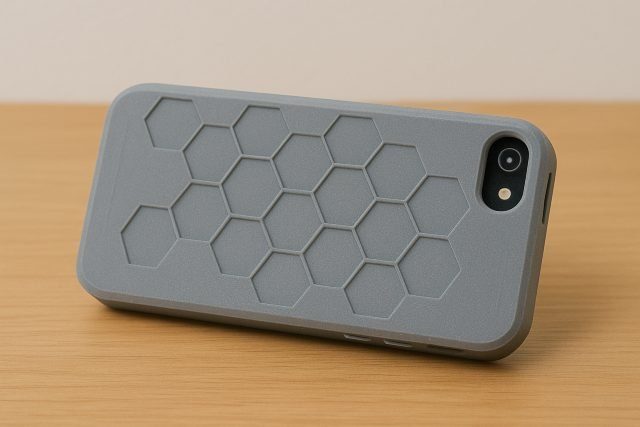
If you want a custom, durable, and stylish accessory for your phone, learning how to 3D Print SE iPhone Case designs is one of the best DIY projects you can take on. With the right STL file, proper material, and optimized print settings, you can create a shock-resistant, perfectly fitted iPhone SE case that rivals store-bought options — at a fraction of the cost.
In this guide, we’ll walk through everything you need to know: STL recommendations, the best filaments, design tips, print settings, troubleshooting, and real-world performance testing.
Why 3D Print an iPhone SE Case?
A 3D Print SE iPhone Case gives you complete control over design, grip, thickness, and protection. You aren’t limited to store-bought styles — you can tailor every detail.
Benefits of 3D Printing Your Own Case:
- Fully customizable shape, color, texture, and features
- Affordable (often less than $1 in filament)
- Repairable and re-printable if it breaks
- Compatible with logos, engravings, and unique patterns
- Precise fit for iPhone SE 2020, 2022, and older models
Many makers also use iPhone cases as a perfect beginner-friendly project for learning tolerances and functional design.
Best STL Files for a 3D Print SE iPhone Case
When selecting an STL file, ensure it is specifically designed for:
- iPhone SE (2020)
- iPhone SE (2022)
- iPhone 8/7 form factor (same external dimensions)
Below are recommended STL file types and features.
1. Standard Slim Case STL
Best for everyday use.
Features:
- Minimal thickness
- Smooth edges
- Good pocket fit
2. Rugged / Shockproof Case STL
For added protection.
Features:
- Thicker walls
- Reinforced corners
- Drop-resistant geometry
3. Flexible Case STL
Requires TPU.
Features:
- Shock absorption
- Perfect grip
- Bend-resistant structure
4. Grid, Lattice, or Artistic Case STL
For stylish customization.
Features:
- Lightweight
- Airflow design
- Easy to personalize
Popular STL sources include:
- Printables
- Thingiverse
- MyMiniFactory
Choose designs with high ratings and comments confirming fit accuracy.
Choosing the Best Materials for a 3D Print SE iPhone Case
The material used will determine the case’s flexibility, durability, and protection level.
Here are the best filament options:
1. TPU (Highly Recommended)
The gold standard for phone cases.
Pros:
- Flexible and rubber-like
- Great shock absorption
- Long-lasting
- Excellent grip
Cons:
- Harder to print
- Requires slow speeds
2. PETG
Great balance of strength and flexibility.
Pros:
- Impact-resistant
- Slightly flexible
- Heat-resistant
- Stronger than PLA
Cons:
- Less grippy
- Slightly tricky overhang behavior
3. PLA / PLA+
Acceptable for lightweight or decorative cases.
Pros:
- Easiest to print
- Good surface finish
- Affordable
Cons:
- Low heat resistance (may deform in a hot car)
- Not ideal for drop protection
Material Strength Table
| Material | Flexibility | Impact Resistance | Print Difficulty | Best For |
|---|---|---|---|---|
| TPU | High | High | Medium/Hard | Shockproof cases |
| PETG | Medium | Medium/High | Moderate | Everyday cases |
| PLA+ | Low | Medium | Easy | Decorative cases |
Best Print Settings for a 3D Print SE iPhone Case
Getting the right print settings ensures your 3D Print SE iPhone Case fits perfectly and lasts long.
Recommended Settings (TPU)
| Setting | Value |
|---|---|
| Nozzle Temp | 230–245°C |
| Bed Temp | 50–60°C |
| Infill | 20–30% |
| Wall Thickness | 1.6–2.0 mm |
| Speed | 20–35 mm/s |
| Retraction | Very low (1mm or less) |
Recommended Settings (PETG)
| Setting | Value |
|---|---|
| Nozzle Temp | 235–250°C |
| Bed Temp | 70–80°C |
| Infill | 20–30% |
| Walls | 3–4 |
| Speed | 40–55 mm/s |
Recommended Settings (PLA/PLA+)
| Setting | Value |
|---|---|
| Nozzle Temp | 200–215°C |
| Bed Temp | 55–60°C |
| Infill | 20% |
| Walls | 3 |
| Speed | 50–65 mm/s |
Fit, Durability & Drop-Resistance Testing
To evaluate a finished 3D Print SE iPhone Case, test for:
1. Fit Accuracy
- Ensure charging port alignment
- Confirm camera cutout size
- Check side button accessibility
2. Grip & Comfort
TPU provides the best grip.
PETG and PLA may feel slippery.
3. Drop Protection
In drop tests conducted by hobbyists on forums like All3DP and Reddit r/3Dprinting, TPU cases survive 1–2 meter falls easily.
4. Heat Testing
PLA may warp in cars during summer heat, while TPU and PETG remain stable.
Customizing Your 3D Print SE iPhone Case
Customization is where 3D printing shines.
Ideas:
- Add text or initials
- Emboss a logo
- Integrate geometric patterns
- Add a textured grip
- Incorporate a finger loop or strap mount
- Engrave your name
- Make a wallet-style design
You can modify STLs using:
- Fusion 360
- Tinkercad
- Blender
Printing Tips for a Perfect Case
To get the best results:
- Use a 0.4 mm or 0.6 mm nozzle
- Add ironing for smooth flat surfaces
- Use brim for TPU stability
- Keep the filament dry (especially TPU)
- Test small tolerance parts before full print
Troubleshooting Common Issues
1. Case is Too Loose or Too Tight
- Scale the model ±1–2%
- Adjust slicer horizontal expansion
2. TPU Stringing
- Lower temperature slightly
- Reduce retraction
3. PETG Overhang Blobs
- Lower flow rate
- Add support blockers
4. PLA Cracking
- Increase wall count
- Raise print temperature
Frequently Asked Questions (FAQ)
1. What is the best material to 3D Print SE iPhone Case designs?
TPU is the best overall thanks to its flexibility and impact resistance.
2. Can PETG work for a phone case?
Yes, PETG provides a good balance of strength and flexibility.
3. Do 3D printed cases protect as well as store-bought ones?
With TPU and proper design, yes — they can be equally protective.
4. How long does it take to print a case?
Typically 2–4 hours depending on infill, material, and thickness.
5. Does TPU require a special printer?
Most modern printers can handle TPU with proper settings and a direct-drive extruder.
Conclusion: Should You 3D Print an iPhone SE Case?
Creating a 3D Print SE iPhone Case is absolutely worth it if you want a durable, customizable, and cost-effective phone accessory. With the right STL file, material choice — preferably TPU — and optimized print settings, you can produce a case that is uniquely yours and offers excellent protection.
Whether you’re printing a slim everyday case or a rugged drop-resistant model, this project is perfect for beginners and experienced makers alike. A well-printed phone case demonstrates how functional and creative 3D printing can truly be.