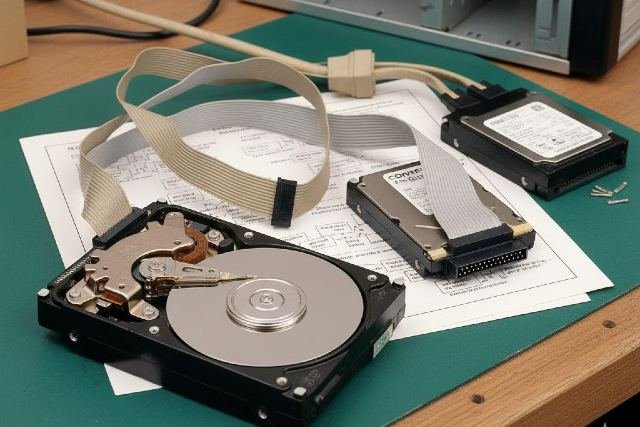
Understanding Old Hard Drive Connector Standards is crucial for anyone working with vintage computers, data recovery, retro gaming rigs, or electronic refurbishing. Before today’s SATA and NVMe drives became the norm, storage devices relied on older interfaces like IDE, PATA, SCSI, and MFM/RLL. Each had unique pin layouts, speed limits, cable types, and compatibility constraints.
Whether you’re restoring a 1990s PC, retrieving data from a legacy server, or exploring computing history, this guide breaks down everything you need to know about old hard drive connector standards — including diagrams, speed charts, and how to adapt old drives to modern systems.
What Are Old Hard Drive Connector Standards? (Definition)
Old Hard Drive Connector Standards refer to legacy interfaces used to connect storage devices to early computers. These include:
- IDE / PATA (Parallel ATA)
- SCSI (Small Computer System Interface)
- MFM / RLL
- ESDI
- ST506/ST412
- Berg & Molex power connectors
These standards dominated computing from the 1980s to early 2000s, and many are still found in industrial machines and archival hardware today.
Why Understanding Old Connectors Matters
- Data recovery: Old drives often contain valuable historical or business data.
- Retro PC building: Vintage gaming rigs require accurate component matching.
- Restoration projects: Museums and collectors maintain legacy systems.
- Industrial repair: CNC machines and medical devices still use old drives.
According to NIST’s Data Preservation Report, an estimated 20–25% of archived digital data still resides on legacy storage devices.
Major Old Hard Drive Connector Standards (In-Depth Breakdown)
Below are the most important legacy connectors, their pin layouts, speeds, cable types, and compatibility notes.
1. IDE / PATA (Parallel ATA)
The Most Common Old PC Drive Standard
Introduced in 1986, IDE/PATA became the dominant desktop hard drive connector throughout the 1990s and early 2000s.
Connector Type:
- 40-pin ribbon cable (standard)
- 44-pin laptop connector (adds power pins)
Pin Layout (40-Pin IDE Example)
| Pin | Function | Pin | Function |
|---|---|---|---|
| 1 | Reset | 2 | Ground |
| 3 | Data Bit 7 | 4 | Data Bit 8 |
| … | … | … | … |
| 39 | Drive Active | 40 | Ground |
Speeds (ATA Modes)
| ATA Version | Max Speed |
|---|---|
| ATA-1 | 8.3 MB/s |
| ATA-2 (EIDE) | 16.6 MB/s |
| ATA-4 (UDMA33) | 33 MB/s |
| ATA-5 (UDMA66) | 66 MB/s |
| ATA-6 (UDMA100) | 100 MB/s |
| ATA-7 (UDMA133) | 133 MB/s |
Compatibility Notes
- Master/Slave jumpers required for multi-drive setups
- 80-wire cables needed for ATA66+ speeds
- Fully incompatible with SATA without an adapter
2. SCSI (Small Computer System Interface)
Used in Servers, High-End PCs & Workstations
SCSI was the performance king before SATA existed.
SCSI Connector Types
- 50-pin (Narrow SCSI)
- 68-pin (Wide SCSI)
- 80-pin (SCA for hot-swap servers)
Pin Layout (50-Pin SCSI)
| Type | Pins | Notes |
|---|---|---|
| Internal ribbon | 50 | Similar to IDE but keyed differently |
| External Centronics | 50 | Large, printer-style connector |
Speed Evolution
| Standard | Speed |
|---|---|
| SCSI-1 | 5 MB/s |
| Fast SCSI | 10 MB/s |
| Ultra SCSI | 20 MB/s |
| Ultra2 | 40 MB/s |
| Ultra3 / U160 | 160 MB/s |
| Ultra320 | 320 MB/s |
Compatibility Notes
- Requires termination at both ends of the cable
- IDs assigned via jumper or switch
- Excellent multi-device support (up to 15 drives per bus)
3. MFM & RLL (Early PC Storage Standards)
Dominated the 1980s Home PC Market
Before IDE existed, PCs relied on MFM and RLL drives controlled by ISA bus expansion cards.
Connector Types
- Two cables per drive:
- 34-pin control cable
- 20-pin data cable
Speeds
- MFM: ~5–7 MB/s
- RLL: ~7–10 MB/s (more efficient encoding)
Compatibility
- Not interchangeable with IDE
- Drives must match controller type
- Most often seen in IBM XT/AT systems
4. ESDI (Enhanced Small Device Interface)
A bridge between MFM/RLL and IDE.
Features
- Faster encoding
- Better reliability
- 34-pin + 20-pin cable arrangement (like MFM)
Speeds
Up to 20 MB/s, making it faster than MFM but slower than later ATA standards.
5. ST506 / ST412 Connectors
Used in the Earliest Hard Drives (1980s)
These drives required:
- 34-pin control cable
- 20-pin data cable
Similar to MFM but not compatible with it.
Old Hard Drive Power Connector Standards
1. Molex 4-Pin (Most Common)
Used from the 1980s to mid-2000s.
| Pin | Wire Color | Function |
|---|---|---|
| 1 | Yellow | +12V |
| 2–3 | Black | Ground |
| 4 | Red | +5V |
2. Berg 4-Pin
Used on floppy drives.
3. Integrated Power on 44-Pin IDE
Used on laptop drives — no Molex needed.
Compatibility: Can Old Drives Work on Modern PCs?
Yes — But you need adapters.
Common IDE/SCSI to USB Adapters
- IDE to USB 3.0
- SATA/IDE combo adapters
- SCSI to USB bridges (rare & expensive)
Challenges
- Data corruption from aging drives
- Proprietary connectors on some OEM hardware
- OS compatibility issues (Windows 10–11 won’t read early file systems without tools)
File Systems You May Encounter
- FAT16
- HPFS (OS/2)
- EXT2 (old Linux)
- HFS (classic Apple)
Comparison Table of Old Hard Drive Connector Standards
| Standard | Pins | Max Speed | Used In | Notable Features |
|---|---|---|---|---|
| IDE/PATA | 40/44 | 133 MB/s | Home PCs | Master/slave jumpers |
| SCSI | 50/68/80 | 320 MB/s | Servers | Multi-device support |
| MFM | 34+20 | ~7 MB/s | Early PCs | Controller dependent |
| RLL | 34+20 | ~10 MB/s | 1980s PCs | Efficient encoding |
| ESDI | 34+20 | ~20 MB/s | Late 80s PCs | Faster than MFM |
| ST506 | 34+20 | ~5 MB/s | Early HDDs | Oldest PC standard |
Real-World Example (Case Study)
Case: Data Recovery from a 1992 Accounting PC
A business needed tax records stored on a 540MB IDE drive from 1992.
Process
- A USB-to-IDE adapter connected the drive to a modern PC.
- FAT16 file system was read using Linux.
- 96% of files were successfully recovered.
Outcome
Shows why understanding Old Hard Drive Connector Standards remains valuable today.
Recommended Image
File Name: old-hard-drive-connector-standards-diagram.jpg
Alt Text: Illustration of old hard drive connector standards including IDE, SCSI, and MFM cables
FAQ: Old Hard Drive Connector Standards
What are the main old hard drive connector standards?
The most common are IDE/PATA, SCSI, MFM/RLL, ESDI, and ST506.
Can old drives be connected to modern computers?
Yes — with IDE-to-USB or SCSI-to-USB adapters, though compatibility varies.
Which old standard was the fastest?
Ultra320 SCSI was the fastest legacy connector, reaching 320 MB/s.
What is the difference between IDE and PATA?
They are essentially the same; PATA became the more formal term as SATA emerged.
How do I identify an old hard drive connector?
Check the pin count, cable width, and whether the drive uses one ribbon cable or two.
Conclusion: Why Understanding Old Hard Drive Connector Standards Still Matters
Old Hard Drive Connector Standards remain essential knowledge for anyone repairing legacy devices, preserving digital history, or performing complex data recovery. From IDE to SCSI and early MFM systems, each connector type has unique pin layouts, speed limits, and compatibility concerns. With the right adapters and technical understanding, these old drives can still be accessed, restored, or repurposed today.
Whether you’re a retro computing enthusiast, IT technician, or data preservation specialist, understanding these standards ensures you can work confidently with the past — and keep valuable data alive for the future.