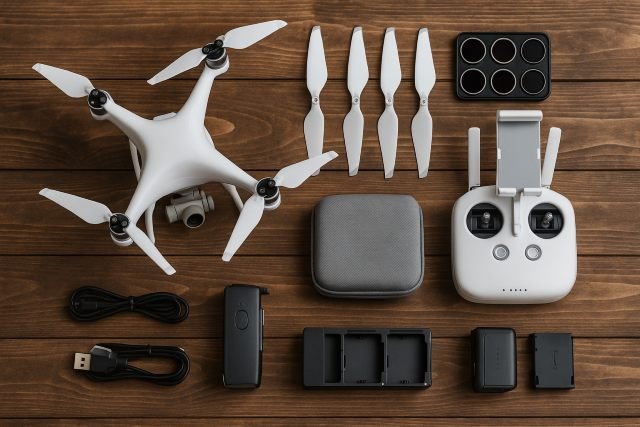
If you’ve just bought a shiny new drone and want your footage to look cinematic (and not like shaky holiday clips), the right Drone Accessories make a huge difference. From ND filters and spare batteries to landing pads and safety strobes, smart add-ons can extend flight time, protect your gear, and dramatically improve image quality.
- Why Drone Accessories Matter for Aerial Photography
- 1. Power Essentials: Batteries, Chargers & Power Banks
- 2. Image Quality Boosters: Filters, Memory Cards & More
- 3. Protection & Transport: Cases, Backpacks & Landing Pads
- 4. Safety & Compliance: Lights, ID & Checklists
- 5. Control & Comfort: Mounts, Straps & Monitors
- 6. Advanced & Creative Drone Accessories
- Example Kits: Drone Accessories for Different Pilots
- FAQ: Best Drone Accessories for Aerial Photography
- Conclusion: Build a Smart Drone Accessories Kit, Not a Random One
In this guide, we’ll walk through the best Drone Accessories for aerial photography, explain what each one actually does, and help you pick the right kit for your style of flying — whether you’re shooting real estate, travel content, or just gorgeous sunsets.
Why Drone Accessories Matter for Aerial Photography
Consumer drones have exploded in popularity as cameras and safety features have improved and prices have dropped. Recent market research estimates the global consumer drone market at around USD 5–5.1 billion in 2023, with forecasts to triple by early 2030s as photography and content creation drive demand.
That means more pilots in the sky competing for attention. Accessories help you:
- Fly longer (extra batteries, multi-chargers)
- Shoot cleaner, more cinematic images (ND filters, high-speed cards)
- Protect people and gear (landing pads, cases, prop guards, strobes)
- Stay legal and professional (Remote ID modules, safety gear)
Think of accessories as the “lenses and tripod” of the drone world — they transform what your drone is capable of. For enthusiasts and content creators alike, stunning aerial shots can also be turned into framed photo prints, letting you showcase your drone photography as high-quality, display-ready art.
1. Power Essentials: Batteries, Chargers & Power Banks
Extra batteries: the #1 drone accessory
Almost every accessory list puts spare batteries at the top, because your flight time is your limiting factor.
Why you need them:
- Most consumer camera drones fly 20–40 minutes per battery in ideal conditions — and less in wind or cold.
- Real-world shoots (especially photo brackets or video takes) eat that time quickly.
Tip: Aim for 3 batteries total for casual creators and 4–6 for commercial workdays.
Multi-chargers & car chargers
A multi-charger hub lets you drop several batteries into one unit and charge them sequentially or in parallel (depending on model). Many brands also offer car chargers for topping up between locations.
This is huge for travel and long shooting days. If you shoot weddings, real estate, or travel vlogs, having a hub and a car charger is almost mandatory.
Power banks for your controller & phone
Your drone controller and phone/tablet can die before your drone does — especially in cold weather or when screen brightness is maxed.
Look for:
- High-capacity power bank (at least 10,000–20,000 mAh)
- Fast-charging output (e.g., 18W+ USB-C PD)
You can’t charge drone flight batteries directly from typical power banks (most require proprietary chargers), but you can keep your controller and display alive all day.
2. Image Quality Boosters: Filters, Memory Cards & More
ND filters: sunglasses for your drone camera
For aerial videography, ND (Neutral Density) filters are easily one of the most important Drone Accessories. ND filters reduce the amount of light hitting the sensor so you can keep your shutter speed at roughly 2× your frame rate (the 180° shutter rule) for natural motion blur and cinematic footage.
Benefits:
- Smooth motion in pans and tracking shots
- Less flicker and harsh, crunchy footage in bright daylight
- More control over exposure and highlights
Common ND strengths for drones:
| Filter | Typical Use Case |
|---|---|
| ND8 | Overcast / golden hour video |
| ND16 | Bright but not harsh daylight |
| ND32 | Midday sun / reflective surfaces (water) |
| ND64 | Very bright conditions / long exposures |
Many drone-focused education sites argue ND filters are essential for serious aerial cinematography, not just a “nice-to-have.”
Polarizing filters (CPL)
A circular polarizer (CPL) cuts glare and reflections from water, glass, and foliage. It can make skies richer and colors more saturated — great for landscape and travel shots. Many kits combine ND + CPL in a single filter to save weight and hassle.
High-speed microSD cards
Your drone can only write video as fast as your memory card allows. Using a slow or unreliable card risks dropped frames, recording errors, or corrupted footage.
Look for:
- U3 / V30 rating minimum for 4K video
- V60 / V90 if you’re shooting high-bitrate 4K/60 or 5.4K/6K on newer drones
- Reputable brands recommended by your drone manufacturer
Always format cards inside the drone before a shoot.
Lens cleaning kit & gimbal guard
A small microfiber cloth and lens wipes are cheap but crucial Drone Accessories. Dust, fingerprints, and sea spray show up very clearly in backlit aerial shots.
For transport, use a gimbal clamp/guard (most drones ship with one). It locks the delicate camera and motors in place to avoid shocks that can cause calibration errors or permanent damage.
3. Protection & Transport: Cases, Backpacks & Landing Pads
Hard cases & backpacks
If you travel with your drone, a dedicated case or backpack is a must. Accessory-focused retailers consistently list cases near the top of essential Drone Accessories because they protect your investment and organize batteries, filters, and cables.
Options:
- Hard cases – maximum protection, often waterproof and crushproof; ideal for checked luggage, boats, or rough field work.
- Backpacks / sling bags – more portable and comfortable for hiking and travel; look for custom foam or dividers.
Landing pads
A foldable landing pad gives you a clean, flat surface for takeoff and landing:
- Keeps dust, sand, and grass away from the gimbal and motors
- Highly visible for landing RTH (Return to Home)
- Very helpful on gravel, snow, or tall grass
These are frequently recommended as core Drone Accessories for anyone who flies off-road or near the beach.
Propeller guards & spare props
- Propeller guards are great when you’re learning, flying indoors, or working near people/structures. They help prevent minor collisions from becoming major accidents.
- Spare propellers are non-negotiable. A single chip or bend can cause vibration and blurry footage; most drone accessory lists call them essential backups.
4. Safety & Compliance: Lights, ID & Checklists
Anti-collision lights & strobes
High-intensity strobe lights help you:
- Maintain visual line of sight at greater distances
- Increase visibility to other airspace users at dawn/dusk
- Comply with local rules that require anti-collision lighting for night operations in some regions
They’re small, lightweight Drone Accessories that can prevent very big problems.
Remote ID modules & registration
In the U.S. and many other regions, regulators now require Remote ID, a kind of digital license plate for drones that broadcasts identification and location info during flight.
Key points (US-focused but similar trends worldwide):
- Most drones that need registration must also comply with Remote ID.
- You can comply via:
- A Standard Remote ID drone (built-in), or
- A Remote ID broadcast module you attach as an accessory.
If your drone doesn’t have Remote ID built in, a compliant module is now effectively a “must-have” accessory, not just an optional extra.
Pre-flight checklist apps or cards
Whether it’s a printed card or an app, a pre-flight checklist helps you:
- Confirm firmware updates
- Check props, gimbal, and battery status
- Confirm airspace permissions and weather
It sounds basic, but a two-minute checklist prevents many crashes and flyaways.
5. Control & Comfort: Mounts, Straps & Monitors
Tablet/phone sun hood
Bright sunlight makes it almost impossible to see your screen. A simple sun hood or shade that clips onto your controller or tablet greatly improves visibility and composition.
Neck straps & controller grips
For longer sessions, neck straps or ergonomically shaped controller grips help reduce fatigue and keep your controller secure if you slip.
Extended-range antennas (use cautiously)
Some third-party antennas claim to boost signal range. In reality:
- They can help in high-interference environments.
- You still must obey your local rules about VLOS (visual line of sight), altitude, and no-fly zones.
Use these accessories for reliability and signal stability — not to break regulations.
6. Advanced & Creative Drone Accessories
FPV goggles (for supported drones)
Some drones support FPV goggles, giving you an immersive first-person view. These can:
- Help with precise framing
- Make flying more intuitive for certain styles (e.g., cinewhoop / FPV hybrids)
Always follow your region’s rules — many require a visual observer if you fly with goggles.
Audio recorders & on-ground mics
Drone footage is visually stunning—but drones sound like hairdryers. For better storytelling:
- Use a separate audio recorder (or your phone with a mic) on the ground.
- Sync audio in post to add ambience, interviews, or voiceover.
This isn’t a drone accessory in the strictest sense, but it’s a massive upgrade for aerial video projects.
Software & LUTs
Don’t forget the “digital accessories”:
- Flight planning apps for waypoints, orbits, and mapping
- Photo/video editing software (Lightroom, Premiere, DaVinci Resolve)
- Custom LUTs (color grading presets) for your drone’s log or D-Cinelike profiles
Many content creators treat LUT packs and editing software as critical parts of their drone kit.
Example Kits: Drone Accessories for Different Pilots
A. Beginner aerial photographer kit
For someone just getting serious about drone photos:
- 2–3 extra batteries
- Landing pad
- ND filter set (ND8, ND16, ND32)
- Hard case or backpack
- Spare props and a basic toolkit
- Fast microSD card (U3/V30)
This covers flight time, protection, and the biggest image-quality upgrade (ND filters).
B. Travel & hiking kit
If you hike or travel a lot:
- Lightweight sling/backpack with space for water/snacks
- Compact folding landing pad
- Power bank + cables for phone/controller
- 3 batteries + multi-charger hub
- Slim ND/CPL set
Here, weight and portability matter as much as pure performance.
C. Real estate / commercial kit
For paid jobs, reliability is everything:
- 4–6 batteries + multi-charger
- Two or more high-speed microSD cards (rotate them)
- ND & CPL filters for consistent exposure in any light
- Hard case for secure transport between jobs
- Strobe lights and, if needed, Remote ID module
- Spare props, prop guards for tight spaces
- Checklists and airspace/permit planning apps
This setup lets you show up to a client shoot confident that you can deliver, even if conditions change.
FAQ: Best Drone Accessories for Aerial Photography
1. What are the most important Drone Accessories for beginners?
For most new pilots, the top Drone Accessories are:
- Extra batteries
- High-speed microSD card
- ND filters (for video)
- Landing pad
- Spare props and a basic case
These cover flight time, image quality, and basic protection, as also recommended in many accessory round-ups.
2. Do I really need ND filters for drone videography?
If you want cinematic-looking video, yes. ND filters let you keep shutter speed near 2× your frame rate for natural motion blur and avoid overexposure in bright light. Drone and photography education sites consistently describe ND filters as a fundamental tool for serious aerial videographers.
3. How many batteries should I buy for my drone?
Three is a good baseline (one in the drone, two spares). Commercial operators often carry 4–6. Accessory guides and pro pilots agree that extra batteries are the single best way to extend creative possibilities on location.
4. Which Drone Accessories help with safety and legal compliance?
Key safety/compliance accessories include:
- Remote ID module (if your drone doesn’t have built-in Remote ID and your country requires it)
- High-visibility strobes for night and low-light flying
- Prop guards when flying near people or indoors
- Pre-flight checklist (printed or app-based)
Combined with proper registration and understanding of your local regulations, these keep flights safe and professional.
5. What internal & external resources should I read next?
On your site, it’s smart to link to:
- [Beginner Drone Buying Guide]
- [How to Edit Drone Photos Like a Pro]
- [Drone Laws & Registration Explained]
Externally, consider linking to:
- Official regulatory info (e.g., FAA Remote ID pages for US pilots)
- Reputable accessory round-ups and ND filter tutorials for deeper dives.
These links build trust and help readers go from curiosity to confident action.
Conclusion: Build a Smart Drone Accessories Kit, Not a Random One
The best Drone Accessories are the ones that solve real problems for the way you fly: more flight time, cleaner images, safer operations, and smoother workflows.
If you start with extra batteries, ND filters, a good card, a landing pad, and a solid case, you’ll already be far ahead of most casual pilots. From there, add safety gear (strobes, Remote ID module), comfort upgrades (sun hood, controller strap), and creative tools (FPV goggles, editing software) as your skills and needs grow.
Treat your accessories as an integrated kit rather than a random shopping list, and you’ll find that every flight becomes more productive, more cinematic, and a lot more fun.